
AZ-400 · Question #512
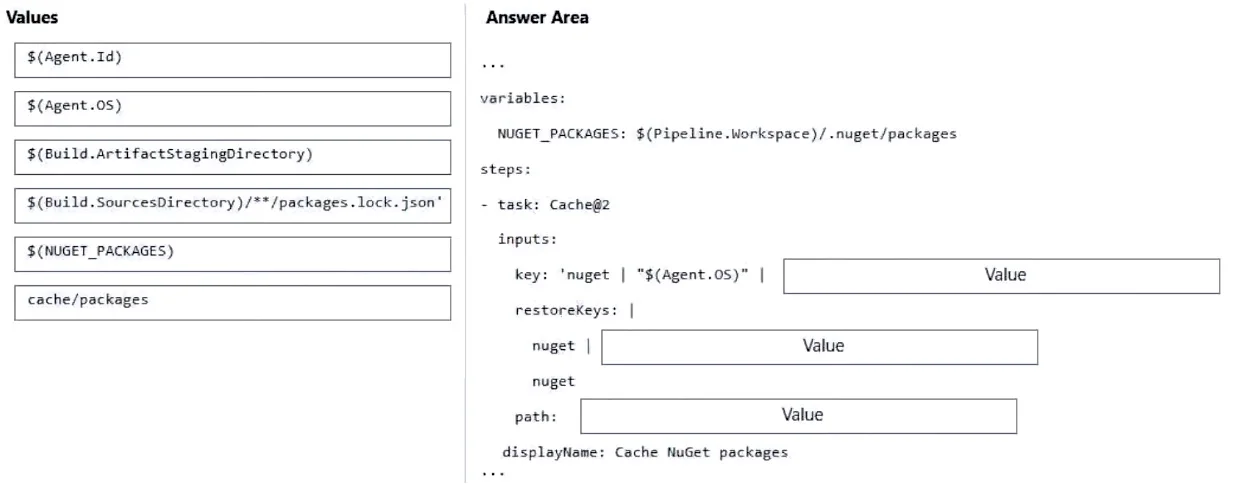
Drag and Drop Question You use an Azure pipeline to build a .NET app that has NuGet dependencies. You need to ensure that the pipeline caches required NuGet packages. How should you configure the…
The correct answer is $(Build.SourcesDirectory)/**/packages.lock.json; $(NUGET_PACKAGES). To cache NuGet packages in an Azure Pipeline, you need two key values: the 'key' (cache identifier) should be '$(Build.SourcesDirectory)/**/packages.lock.json' because the lock file captures the exact dependency tree and its hash is used to determine cache hits/misses, and the…
Question
Exhibits
Answer Area
Drag items
Correct arrangement
- $(Build.SourcesDirectory)/**/packages.lock.json
- $(NUGET_PACKAGES)
Explanation
To cache NuGet packages in an Azure Pipeline, you need two key values: the 'key' (cache identifier) should be '$(Build.SourcesDirectory)/**/packages.lock.json' because the lock file captures the exact dependency tree and its hash is used to determine cache hits/misses, and the 'path' should be '$(NUGET_PACKAGES)' because this environment variable points to the global NuGet packages cache directory where NuGet stores downloaded packages. Together, these ensure the cache is invalidated when dependencies change and that the correct directory is saved and restored.
Topics
Community Discussion
No community discussion yet for this question.