
AZ-400 · Question #480
Drag and Drop Question You have a large repository named Repo1 that contains a directory named directory1. You plan to modify files in directory1. You need to create a clone of Repo1. The solution…
The correct answer is git fetch; scalar clone; git sparse-checkout. The correct script uses 'scalar clone' to perform an optimized partial clone of the large repository (minimizing initial data transfer), then 'git fetch' to retrieve the necessary objects, and finally 'git sparse-checkout' to limit the working directory to only 'directory1'…
Question
Exhibit
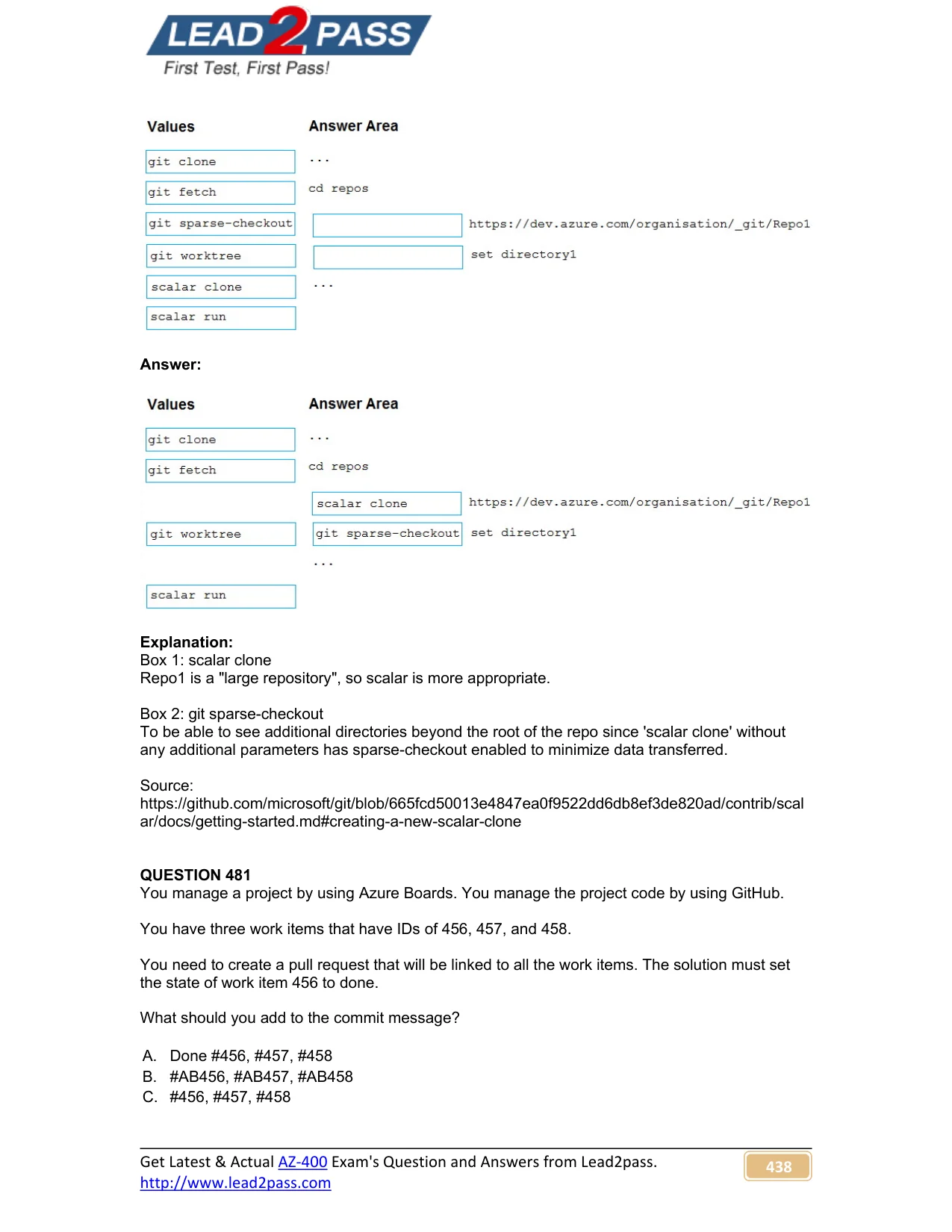
Answer Area
Drag items
Correct arrangement
- git fetch
- scalar clone
- git sparse-checkout
Explanation
The correct script uses 'scalar clone' to perform an optimized partial clone of the large repository (minimizing initial data transfer), then 'git fetch' to retrieve the necessary objects, and finally 'git sparse-checkout' to limit the working directory to only 'directory1' - ensuring only the required files and history are transferred and checked out. Scalar is specifically designed for large repositories and enables features like partial clone and sparse-checkout automatically, while 'git sparse-checkout' restricts the working tree to the specified directory, further minimizing data transfer.
Topics
Community Discussion
No community discussion yet for this question.