
AZ-400 · Question #456
Drag and Drop Question You have a GitHub repository named repo1. You migrate repo1 to an Azure Repos repository named repo2. After the migration, changes are made to repo1. You need to sync the…
The correct answer is repo2 clone URL; repo2; repo1 clone URL. The script syncs changes from GitHub (repo1) to Azure Repos (repo2) by first cloning repo2 (the Azure Repos destination) locally using its clone URL, then adding repo1 (GitHub source) as a remote using repo1's clone URL, and finally pushing or pulling changes into repo2. This…
Question
Exhibit
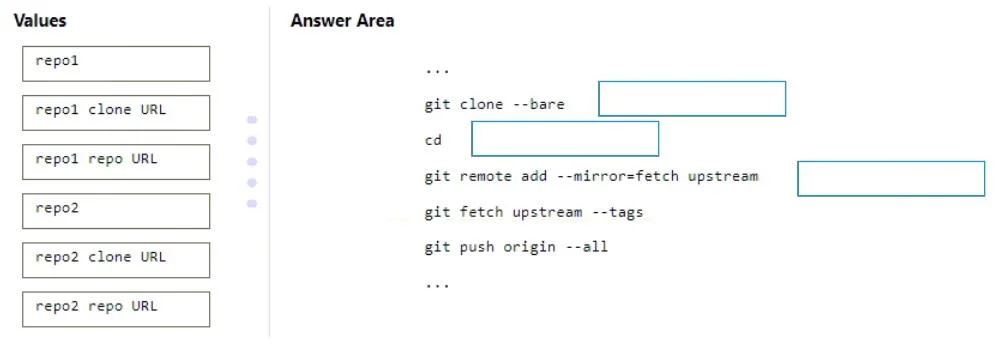
Answer Area
Drag items
Correct arrangement
- repo2 clone URL
- repo2
- repo1 clone URL
Explanation
The script syncs changes from GitHub (repo1) to Azure Repos (repo2) by first cloning repo2 (the Azure Repos destination) locally using its clone URL, then adding repo1 (GitHub source) as a remote using repo1's clone URL, and finally pushing or pulling changes into repo2. This three-step pattern - clone the destination, add the source as a remote, then sync - is the standard Git workflow for migrating and keeping repositories in sync across platforms.
Topics
Community Discussion
No community discussion yet for this question.