
AZ-400 · Question #451
Hotspot Question You have an Azure subscription that contains an Azure key vault named Vault1, an Azure pipeline named Pipeline1, and an Azure SQL database named DB1. Pipeline1 is used to deploy an…
This question tests your knowledge of storing secrets in Azure Key Vault and making them accessible to Azure Pipelines securely. You need to configure both Key Vault storage and pipeline integration correctly.
Question
Exhibit
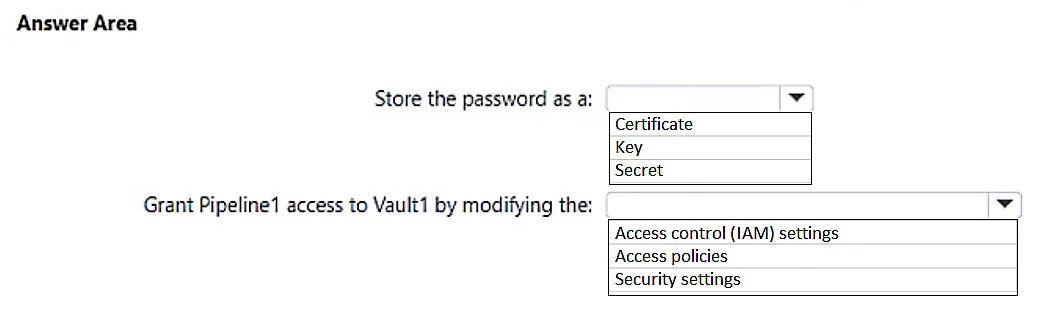
Answer Area
- Store the password as a:CertificateKeySecret
- Grant Pipeline1 access to Vault1 by modifying the:Access control (IAM) settingsAccess policiesSecurity settings
Explanation
This question tests your knowledge of storing secrets in Azure Key Vault and making them accessible to Azure Pipelines securely. You need to configure both Key Vault storage and pipeline integration correctly.
Approach. First, you should store the password as a Secret in Azure Key Vault (Vault1) - not a Key or Certificate - because passwords are sensitive string values best represented as secrets. Second, you need to link the Key Vault to the Azure Pipeline by adding an Azure Key Vault task or creating a Variable Group in Azure DevOps that is linked to Vault1, which allows Pipeline1 to retrieve the secret at runtime. The pipeline must also have an authorized service connection (Service Principal) with 'Get' and 'List' permissions on Vault1's secrets via an Access Policy or RBAC role (Key Vault Secrets User). This ensures the password is never stored in plain text in the pipeline and is retrieved securely from Key Vault during execution.
Concept tested. Azure Key Vault secret storage and Azure Pipelines integration - specifically how to store a password as a Key Vault Secret and grant a pipeline access to it using Variable Groups or the Key Vault task with appropriate service principal permissions.
Reference. https://learn.microsoft.com/en-us/azure/devops/pipelines/release/azure-key-vault?view=azure-devops
Topics
Community Discussion
No community discussion yet for this question.