
AZ-400 · Question #446
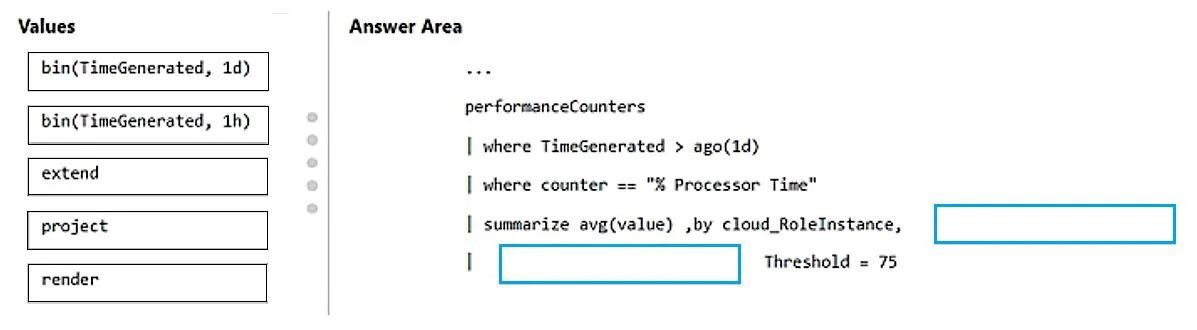
Drag and Drop Question You have a web app named App1 that uses Application Insights in Azure Monitor. You need to compare the hourly CPU usage of App1 from the last 24 hours. The solution must…
The correct answer is bin(TimeGenerated, 1h). The correct answer is 'bin(TimeGenerated, 1h)' because the requirement specifies comparing hourly CPU usage, and the 'bin()' function groups timestamps into discrete time buckets - using '1h' creates one-hour intervals across the 24-hour window. This allows the query to…
Question
Exhibit
Answer Area
Drag items
Correct arrangement
- bin(TimeGenerated, 1h)
Explanation
The correct answer is 'bin(TimeGenerated, 1h)' because the requirement specifies comparing hourly CPU usage, and the 'bin()' function groups timestamps into discrete time buckets - using '1h' creates one-hour intervals across the 24-hour window. This allows the query to aggregate and visualize CPU metrics per hour, which is essential for trend comparison. The '1d' option would collapse all 24 hours into a single bucket, defeating the purpose of hourly comparison.
Topics
Community Discussion
No community discussion yet for this question.