
AZ-400 · Question #442
Drag and Drop Question You have an Azure subscription that uses Azure Automation State Configuration to manage the configuration of virtual machines. You need to identify which nodes are…
The correct answer is DscReportStatus; Category; ResultType. The correct query uses 'DscReportStatus' as the table source (which stores DSC node compliance data in Log Analytics), 'Category' to filter for the specific log category, and 'ResultType' to filter for noncompliant nodes (e.g., where ResultType == 'Failed' or 'NonCompliant')…
Question
Exhibit
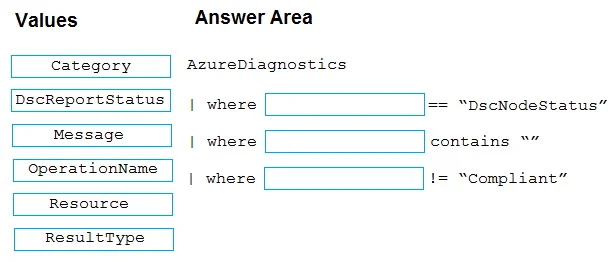
Answer Area
Drag items
Correct arrangement
- DscReportStatus
- Category
- ResultType
Explanation
The correct query uses 'DscReportStatus' as the table source (which stores DSC node compliance data in Log Analytics), 'Category' to filter for the specific log category, and 'ResultType' to filter for noncompliant nodes (e.g., where ResultType == 'Failed' or 'NonCompliant'). This combination allows you to correctly identify nodes that are out of compliance by querying the appropriate Azure Monitor / Log Analytics table and filtering on the compliance result field.
Topics
Community Discussion
No community discussion yet for this question.