
AZ-400 · Question #428
Hotspot Question You use Git for source control. You have an app named App1. In the main branch, you need to restore the third most recent revision of a file named App.exe.config. How should you…
The correct answer is git [dropdown selection] main: checkout; git restore [dropdown selection] main~3 App.exe.config: --source. This question tests knowledge of Git commands to restore a specific historical revision of a file. The goal is to retrieve the third most recent version of App.exe.config in the main branch.
Question
Exhibit
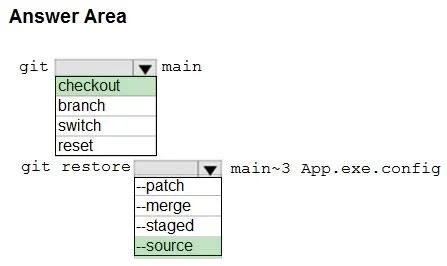
Answer Area
- git [dropdown selection] maincheckoutcheckoutbranchswitchreset
- git restore [dropdown selection] main~3 App.exe.config--source--patch--merge--staged--source
Explanation
This question tests knowledge of Git commands to restore a specific historical revision of a file. The goal is to retrieve the third most recent version of App.exe.config in the main branch.
Approach. The correct command is: 'git checkout main3 -- App.exe.config'. The 'git checkout' command is used to restore files from a specific commit. 'main3' is the relative ref syntax meaning '3 commits before the tip of the main branch' (i.e., the third most recent revision). The '--' separator tells Git that what follows is a file path, not a branch name, and 'App.exe.config' specifies the exact file to restore. This stages the restored version of the file in the working directory and index, ready to be committed.
Concept tested. Git relative commit references and file restoration using 'git checkout <ref> -- <file>'. Key concepts include: (1) tilde notation (HEADn or branchn) to reference ancestor commits - ~1 is parent, ~2 is grandparent, ~3 is great-grandparent (third most recent); (2) the '--' separator to distinguish file paths from branch/commit names; (3) using 'git checkout' (or 'git restore' in newer Git versions) to restore a specific file from a historical commit without switching branches.
Reference. https://git-scm.com/docs/git-checkout - Git documentation on checkout with tree-ish and pathspec
Topics
Community Discussion
No community discussion yet for this question.