
AZ-400 · Question #421
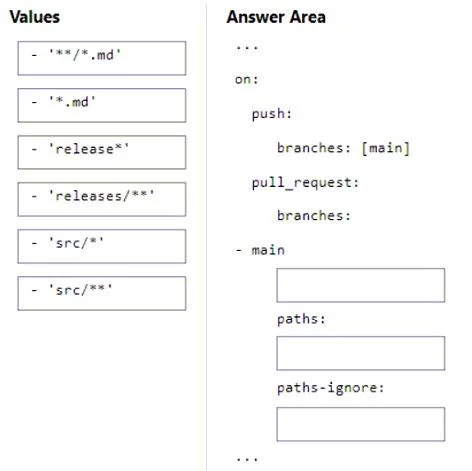
Drag and Drop Question You have a GitHub repository named repo1 that stores the code of an app named App1. You need deploy a workflow for repo1 by using GitHub Actions. The solution must meet the…
The correct answer is releases/**; release*; src/**; **/*.md. The correct arrangement uses 'releases/*' to match branches with the 'releases/' prefix (the double wildcard matches any characters after the slash), 'release' as the branch exclusion or additional pattern for push triggers, 'src/*' to recursively scan all files in…
Question
Exhibit
Answer Area
Drag items
Correct arrangement
- releases/**
- release*
- src/**
- **/*.md
Explanation
The correct arrangement uses 'releases/' to match branches with the 'releases/' prefix (the double wildcard matches any characters after the slash), 'release*' as the branch exclusion or additional pattern for push triggers, 'src/' to recursively scan all files in subdirectories of the src directory (single * would only match one level deep), and '/*.md' to exclude markdown files anywhere in the repository (the double wildcard matches across directory boundaries). In GitHub Actions workflow syntax, 'src/' correctly captures all nested subdirectories and files under src, while '**/*.md' properly matches markdown files in any directory depth.
Topics
Community Discussion
No community discussion yet for this question.