
AZ-400 · Question #418
Drag and Drop Question Your company has a project in Azure DevOps named Project1. All the developers at the company have Windows 10 devices. You need to create a Git repository for Project1. The…
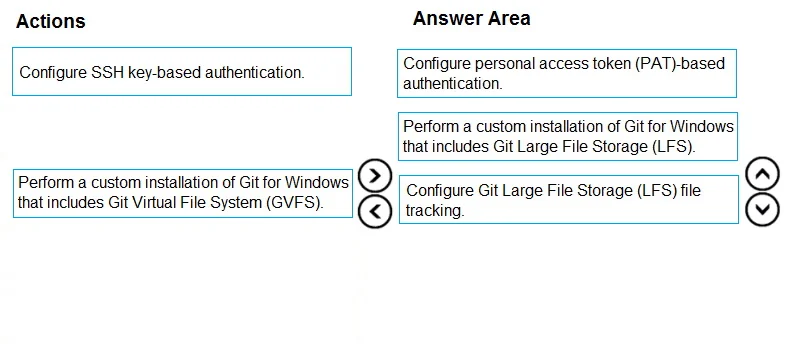
The correct answer is Configure personal access token (PAT)-based authentication.; Perform a custom installation of Git for Windows that includes Git Large File Storage (LFS).; Configure Git Large File Storage (LFS) file tracking. Git Large File Storage (LFS) is the correct solution because it stores large binary files outside the repository (on a remote server) while maintaining lightweight pointer files (metadata) inside the repository using a standard Git workflow. The correct sequence is: (1)…
Question
Exhibit
Answer Area
Drag items
Correct arrangement
- Configure personal access token (PAT)-based authentication.
- Perform a custom installation of Git for Windows that includes Git Large File Storage (LFS).
- Configure Git Large File Storage (LFS) file tracking.
Explanation
Git Large File Storage (LFS) is the correct solution because it stores large binary files outside the repository (on a remote server) while maintaining lightweight pointer files (metadata) inside the repository using a standard Git workflow. The correct sequence is: (1) Configure PAT-based authentication (required for Azure DevOps Git access with LFS), (2) Perform a custom installation of Git for Windows that includes Git LFS (installs the necessary tooling), and (3) Configure Git LFS file tracking (specifies which file types/patterns are tracked by LFS). This satisfies all three requirements: large binary file support, external storage, and standard Git commit-based metadata management.
Topics
Community Discussion
No community discussion yet for this question.