
AZ-400 · Question #386
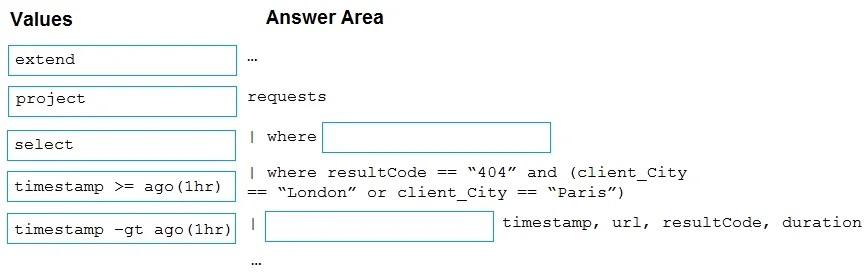
Drag and Drop Question You have a web app named App1 that uses Application Insights in Azure Monitor to store log data. App1 has users in multiple locations. You need to query App1 requests from…
The correct answer is requests; | where timestamp >= ago(1hr); | where resultCode == "404" and (client_City == "London" or client_City == "Paris"); | project timestamp, url, resultCode, duration. The correct query starts with the 'requests' table (the built-in Application Insights table for HTTP request telemetry), then filters by 'timestamp >= ago(1hr)' to limit results to the last hour using the correct KQL syntax with '>=' and 'ago(1hr)'. The '| where resultCode ==…
Question
Exhibits
Answer Area
Drag items
Correct arrangement
- requests
- | where timestamp >= ago(1hr)
- | where resultCode == "404" and (client_City == "London" or client_City == "Paris")
- | project timestamp, url, resultCode, duration
Explanation
The correct query starts with the 'requests' table (the built-in Application Insights table for HTTP request telemetry), then filters by 'timestamp >= ago(1hr)' to limit results to the last hour using the correct KQL syntax with '>=' and 'ago(1hr)'. The '| where resultCode == "404"' clause with city conditions filters for 404 errors from London or Paris, and '| project timestamp, url, resultCode, duration' returns only the specified fields - 'project' is the correct KQL operator for selecting and returning specific columns.
Topics
Community Discussion
No community discussion yet for this question.