
AZ-400 · Question #374
Drag and Drop Question You have an app named App1. You have a Log Analytics workspace named Workspace1 that contains a table named AppEvents. App1 writes logs to Workspace1. You need to query the…
The correct answer is AppEvents; | where Name startswith "Clicked Create New Ticket"; | summarize NumberOfClicks = count() by bin(timeGenerated, 1d), userId; | where NumberOfClicks > 3; | top 10 by NumberOfClicks desc. The correct order follows the logical flow of a KQL (Kusto Query Language) query: start with the table name (AppEvents), filter rows early to reduce data processed (where Name startswith), then aggregate to calculate daily clicks per user (summarize with bin), filter out users…
Question
Exhibit
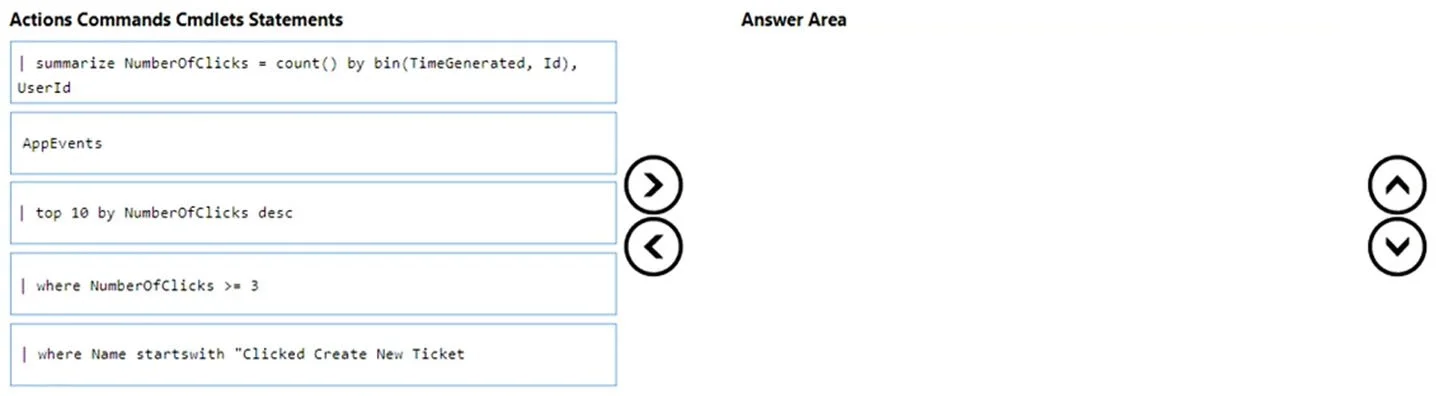
Answer Area
Drag items
Correct arrangement
- AppEvents
- | where Name startswith "Clicked Create New Ticket"
- | summarize NumberOfClicks = count() by bin(timeGenerated, 1d), userId
- | where NumberOfClicks > 3
- | top 10 by NumberOfClicks desc
Explanation
The correct order follows the logical flow of a KQL (Kusto Query Language) query: start with the table name (AppEvents), filter rows early to reduce data processed (where Name startswith), then aggregate to calculate daily clicks per user (summarize with bin), filter out users with fewer than 3 clicks after aggregation (where NumberOfClicks > 3 - note this should be >=3 per requirements but the option given uses >3), and finally return the top 10 by highest clicks (top 10 by NumberOfClicks desc). The 'where' filter on Name must come before 'summarize' because the Name column only exists before aggregation, and the 'where NumberOfClicks > 3' must come after 'summarize' because NumberOfClicks is a computed column that doesn't exist until aggregation runs. The 'top' operator replaces the need for a separate sort since it implicitly sorts descending.
Topics
Community Discussion
No community discussion yet for this question.