
AZ-400 · Question #371
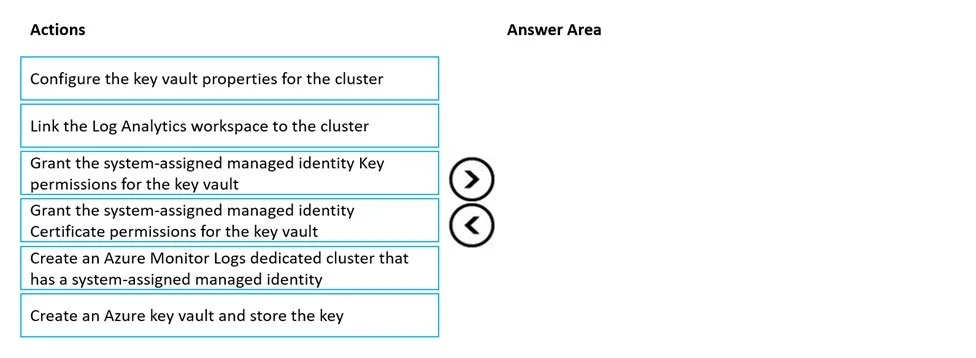
Drag and Drop Question You have an Azure subscription that uses Azure Monitor and contains a Log Analytics workspace. You have an encryption key. You need to configure Azure Monitor to use the key…
The correct answer is Create an Azure key vault and store the key; Create an Azure Monitor Logs dedicated cluster that has a system-assigned managed identity; Grant the system-assigned managed identity Key permissions for the key vault; Configure the key vault properties for the cluster; Link the Log Analytics workspace to the cluster. To encrypt Azure Monitor log data with a customer-managed key (CMK), you must follow a specific dependency chain: first create the key vault and store the key, then create a dedicated cluster with a system-assigned managed identity (which generates the identity needed for…
Question
Exhibit
Answer Area
Drag items
Correct arrangement
- Create an Azure key vault and store the key
- Create an Azure Monitor Logs dedicated cluster that has a system-assigned managed identity
- Grant the system-assigned managed identity Key permissions for the key vault
- Configure the key vault properties for the cluster
- Link the Log Analytics workspace to the cluster
Explanation
To encrypt Azure Monitor log data with a customer-managed key (CMK), you must follow a specific dependency chain: first create the key vault and store the key, then create a dedicated cluster with a system-assigned managed identity (which generates the identity needed for permissions), then grant that identity Key Vault Key permissions (not Certificate permissions), then associate the key vault with the cluster, and finally link the Log Analytics workspace to the cluster. This sequence ensures each prerequisite resource and permission exists before the next step depends on it. Certificate permissions are not required for CMK encryption in Azure Monitor - only Key permissions (Get, Wrap Key, Unwrap Key) are needed.
Topics
Community Discussion
No community discussion yet for this question.