
AZ-400 · Question #197
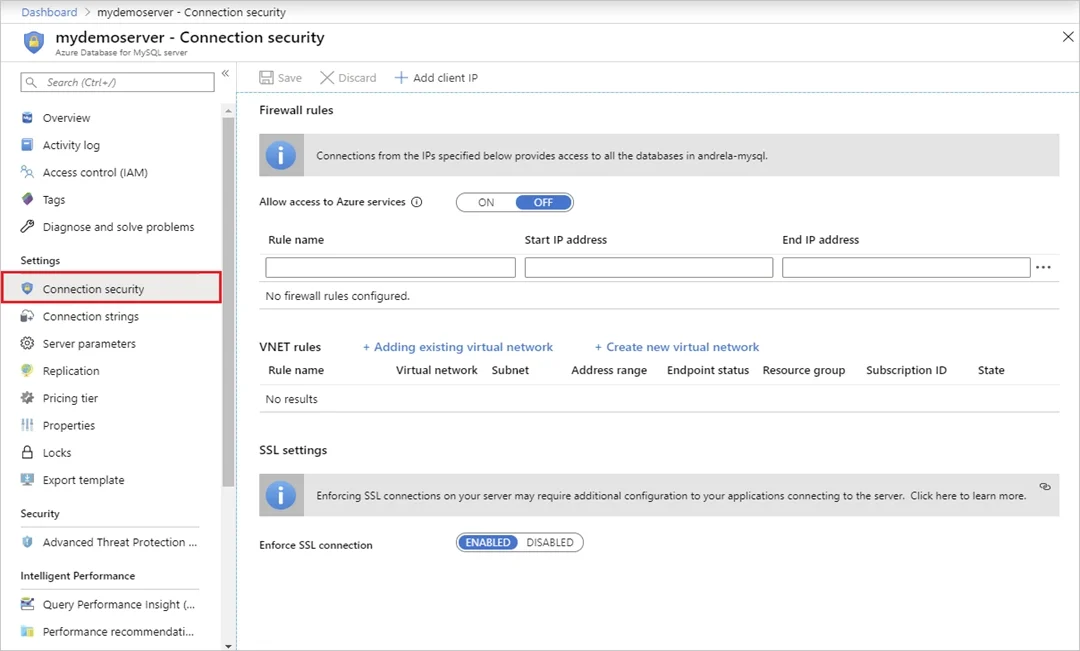
SIMULATION You plan to add a new web farm that will be published by using an IP address of 10.0.0.5. You need to allow traffic from the web farm to an Azure Database for MySQL server named az400…
The correct approach uses server-level firewall rules in Azure Database for MySQL's Connection Security settings to explicitly allow traffic from the specific IP address 10.0.0.5. By setting both the Start IP and End IP fields to the same address (10.0.0.5), you create a…
Question
Exhibit
Explanation
The correct approach uses server-level firewall rules in Azure Database for MySQL's Connection Security settings to explicitly allow traffic from the specific IP address 10.0.0.5. By setting both the Start IP and End IP fields to the same address (10.0.0.5), you create a precise, single-IP rule that grants the web farm access without over-exposing the database server. Saving the rule activates it immediately, enabling the web farm to connect to the MySQL server while keeping all other unauthorized IPs blocked.
Topics
Community Discussion
No community discussion yet for this question.