
AZ-400 · Question #179
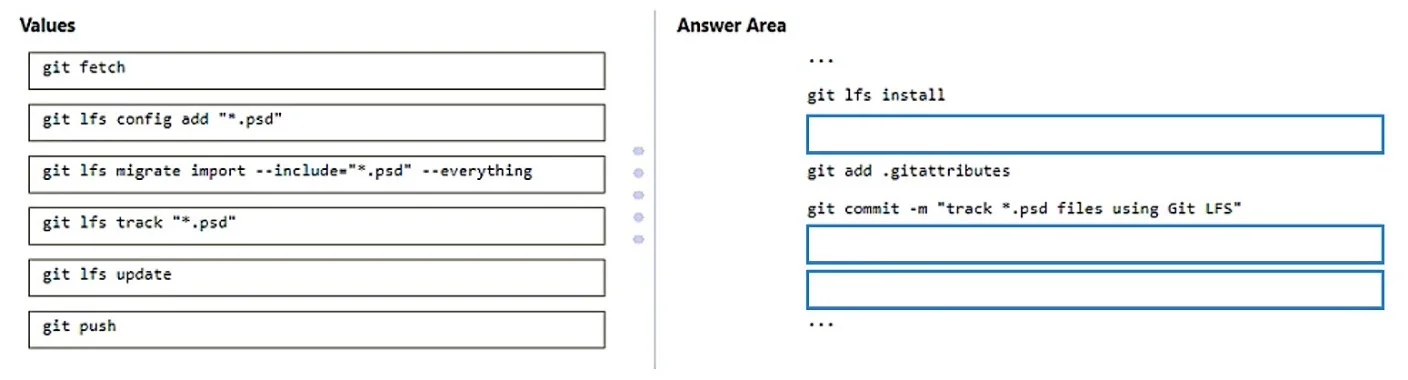
Drag and Drop Question You have an Azure Repos repository that contains large PSD files. You need to configure Git LFS to manage all the files. How should you complete the script? To answer, drag…
The correct answer is git lfs install; git lfs track "*.psd"; git add .gitattributes; git commit -m "track *.psd files using Git LFS"; git push. The correct script follows the standard Git LFS setup workflow: 'git lfs install' initializes LFS in the repository, 'git lfs track "*.psd"' registers the PSD file pattern in .gitattributes, 'git add .gitattributes' stages the tracking configuration, 'git commit' saves the…
Question
Exhibits
Answer Area
Drag items
Correct arrangement
- git lfs install
- git lfs track "*.psd"
- git add .gitattributes
- git commit -m "track *.psd files using Git LFS"
- git push
Explanation
The correct script follows the standard Git LFS setup workflow: 'git lfs install' initializes LFS in the repository, 'git lfs track "*.psd"' registers the PSD file pattern in .gitattributes, 'git add .gitattributes' stages the tracking configuration, 'git commit' saves the configuration, and 'git push' uploads everything to Azure Repos. This sequence ensures LFS tracking is properly configured and persisted in the remote repository before any large files are pushed.
Topics
Community Discussion
No community discussion yet for this question.