
AZ-400 · Question #122
SIMULATION You plan to deploy a template named D:\Deploy.json to a resource group named Deploy- lod9940427. You need to modify the template to meet the following requirements, and then to deploy the…
Azure ARM Template Deployment - Explanation Overall Goal This task tests your ability to modify an Azure Resource Manager (ARM) template to configure a Virtual Network (VNet) with specific IP address constraints, then deploy it via the portal. The core skill is understanding…
Question
Exhibit
Explanation
Azure ARM Template Deployment - Explanation
Overall Goal
This task tests your ability to modify an Azure Resource Manager (ARM) template to configure a Virtual Network (VNet) with specific IP address constraints, then deploy it via the portal. The core skill is understanding CIDR notation and how ARM templates define network resources declaratively.
CIDR Notation Primer (Critical Context)
CIDR (Classless Inter-Domain Routing) notation x.x.x.x/n where /n is the prefix length:
| CIDR | Hosts | Formula |
|---|---|---|
| /24 | 256 | 2^(32-24) = 256 |
| /26 | 64 | 2^(32-26) = 64 |
This is why /24 satisfies "256 addresses" and /26 satisfies "64 addresses." The subnet must fit inside the VNet's address space - /26 fits inside /24.
Step-by-Step Reasoning
Step 1 - Sign in to the portal Required for authentication/authorization. Without this, you cannot access any Azure resources or templates.
Step 2 - Choose template Deploy-lod9940427 The template is pre-staged in the resource group. You're not creating a new one; you're modifying the existing deployment template. Skipping to step 3 without finding the right template means you'd edit the wrong resource.
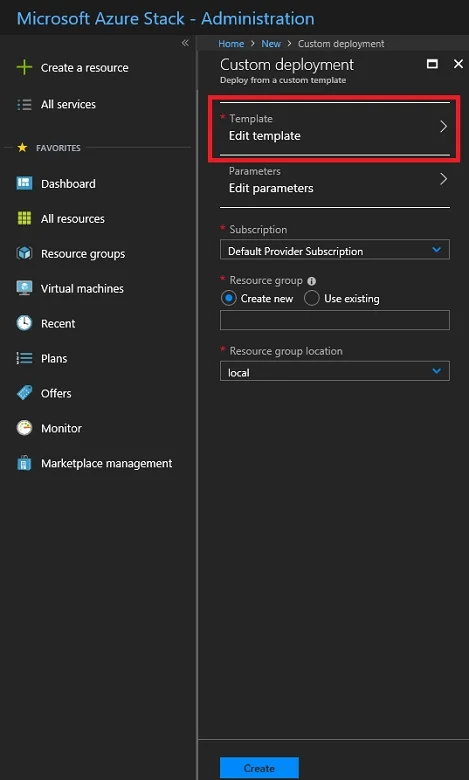
Step 3 - Select Edit template ARM templates are JSON files. The portal provides an inline editor so you can modify the template before deployment. This is where the actual configuration change happens. Deploying without editing first would use the original (wrong) address space.
Step 4 - Change addressPrefixes to 10.0.0.0/24
"addressSpace": {
  "addressPrefixes": ["10.0.0.0/24"]
}
This defines the VNet's total address space - 256 IPs. The original template likely used a larger block (e.g., /16 = 65,536 IPs). Using /23 or larger would violate the "only 256" requirement. Using /25 would give only 128 - too few.
Step 5 - Change firstSubnet addressPrefix to 10.0.0.0/26
"subnets": [{
  "name": "firstSubnet",
  "properties": {
    "addressPrefix": "10.0.0.0/26"
  }
}]
This carves out a subnet within the VNet. The subnet must be a subset of the VNet space - 10.0.0.0/26 is entirely within 10.0.0.0/24. If you used /25 (128 addresses) instead, it exceeds the requirement. If you accidentally used /24 here (matching the VNet), Azure would allow it but you'd have no room for other subnets.
Note: The answer key in your question has a typo - step 5 description says
/26but the JSON snippet incorrectly shows/24. The correct value is/26.
Step 6 - Save Commits your JSON edits to the template. If skipped, your changes are lost and the original (unmodified) template deploys.
Step 7 - Edit parameters ARM templates use parameters to accept runtime values (e.g., VNet name, location). These must be filled before deployment. Skipping causes deployment failure due to missing required inputs.
Step 8 - Select Subscription Azure resources must be billed to a subscription. Every deployment requires one. Missing this means Azure doesn't know where to charge or enforce quota limits.
Step 9 - Select Resource group
Resource groups are logical containers for Azure resources. The task specifies Deploy-lod9940427. Choosing the wrong group deploys to the wrong environment.
Step 10 - Select Create Triggers the actual deployment. Azure validates the template, provisions the VNet/subnet, and shows progress on the dashboard tile.
What Breaks If Steps Are Out of Order
- Skipping Step 4/5 before Save: Template deploys with original CIDR values - fails the requirements.
- Deploying before setting parameters (Step 7): Deployment fails or prompts you mid-deploy.
- Wrong resource group (Step 9): Resources land in the wrong scope, and the grader won't find them.
Memory Tip
"SAVE before you SUBSCRIBE" - Edit -> Save -> Parameters -> Subscription -> Resource Group -> Create. Think of it as filling out a form top-to-bottom: what (template) -> how (params) -> who pays (subscription) -> where (resource group) -> go (create).
For CIDR: /24 = 256, /26 = 64 - each step up in prefix by 2 quarters the address count.
Topics
Community Discussion
No community discussion yet for this question.