
AZ-400 · Question #105
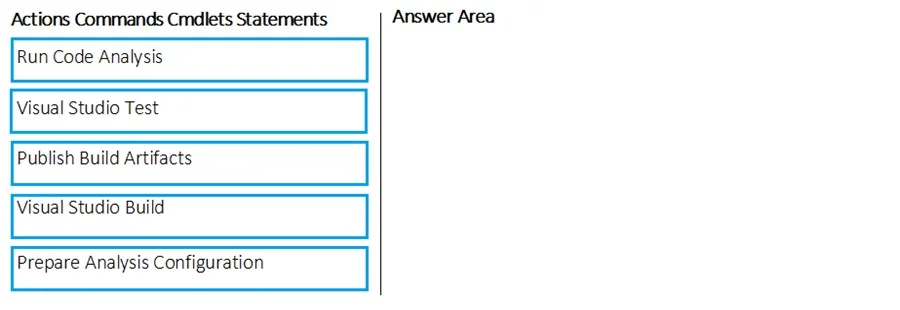
Drag and Drop Question You are developing a full Microsoft .NET Framework solution that includes unit tests. You need to configure SonarQube to perform a code quality validation of the C# code as…
The correct answer is Prepare Analysis Configuration; Visual Studio Build; Visual Studio Test; Run Code Analysis. The correct sequence follows the required SonarQube workflow for a full .NET Framework solution: First, 'Prepare Analysis Configuration' initializes SonarQube and sets up the analysis context before any compilation occurs. Then 'Visual Studio Build' compiles the C# code while…
Question
Exhibit
Answer Area
Drag items
Correct arrangement
- Prepare Analysis Configuration
- Visual Studio Build
- Visual Studio Test
- Run Code Analysis
Explanation
The correct sequence follows the required SonarQube workflow for a full .NET Framework solution: First, 'Prepare Analysis Configuration' initializes SonarQube and sets up the analysis context before any compilation occurs. Then 'Visual Studio Build' compiles the C# code while SonarQube hooks capture build data, followed by 'Visual Studio Test' which runs unit tests so that code coverage metrics are collected and included in the analysis. Finally, 'Run Code Analysis' submits all collected data to the SonarQube server to produce the quality report - this must come last after both build and test data are available.
Topics
Community Discussion
No community discussion yet for this question.