
AZ-305 · Question #382
Drag and Drop Question You have 15 on-premises Hyper-V virtual machines. You have an Azure subscription that contains an Azure Migrate project named Project1. You need to assess the virtual machines…
The correct answer is Download the VHD of the Azure Migrate replication appliance.; Create an appliance virtual machine.; Configure the virtual machine for the appliance.; Register the virtual machine for the appliance. To assess Hyper-V VMs using Azure Migrate, you must first download the Azure Migrate appliance VHD from the Azure portal, then create a VM from that VHD in your Hyper-V environment, configure the appliance (providing Azure credentials and project details), and finally register…
Question
Exhibit
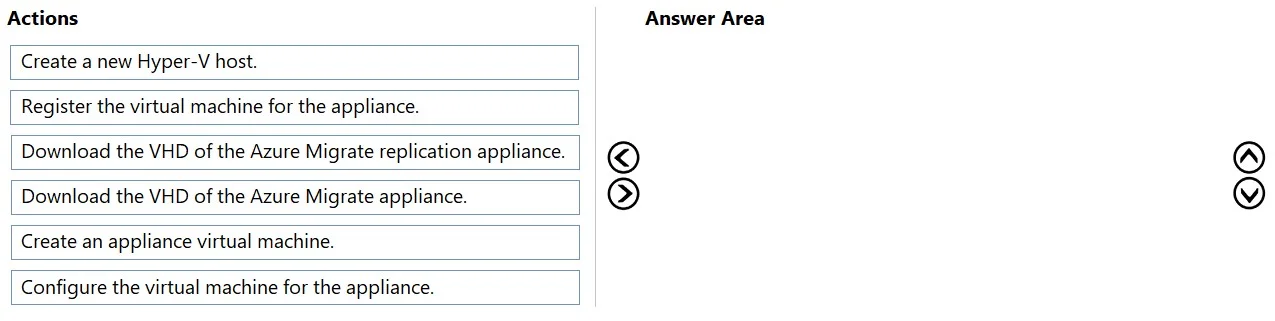
Answer Area
Drag items
Correct arrangement
- Download the VHD of the Azure Migrate replication appliance.
- Create an appliance virtual machine.
- Configure the virtual machine for the appliance.
- Register the virtual machine for the appliance.
Explanation
To assess Hyper-V VMs using Azure Migrate, you must first download the Azure Migrate appliance VHD from the Azure portal, then create a VM from that VHD in your Hyper-V environment, configure the appliance (providing Azure credentials and project details), and finally register the appliance with the Azure Migrate project to begin discovery and assessment. This sequence logically progresses from obtaining the tool, deploying it, setting it up, and connecting it to your Azure Migrate project - all prerequisite steps before any assessment can run.
Topics
Community Discussion
No community discussion yet for this question.