
AZ-220 · Question #70
You have an Azure IoT Central application. You add an IoT device named Oven1 to the application. Oven1 uses an IoT Central template for industrial ovens. You need to send an email to the managers…
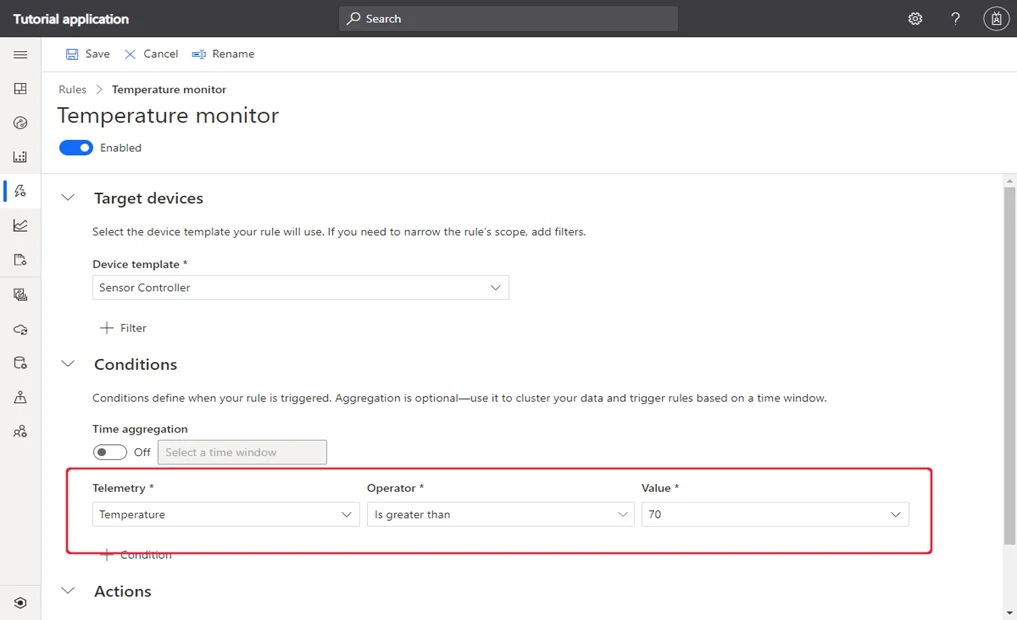
The correct answer is B. Add a condition that has Time Aggregation set to Off. E. From IoT Central, create a telemetry rule for the template. Devices use telemetry to send numerical data from the device. A rule triggers when the selected telemetry crosses a specified threshold. E: To create a telemetry rule, the device template must include at least one telemetry value. The monitors the temperature reported by the…
Question
Exhibit
Options
- ACreate a SendGrid account in the same resource group as the IoT Central application.
- BAdd a condition that has Time Aggregation set to Off.
- CAdd a condition that has Aggregation set to Minimum.
- DAdd the Manager role to the IoT Central application.
- EFrom IoT Central, create a telemetry rule for the template.
How the community answered
(43 responses)- A5% (2)
- B79% (34)
- C12% (5)
- D5% (2)
Explanation
Devices use telemetry to send numerical data from the device. A rule triggers when the selected telemetry crosses a specified threshold. E: To create a telemetry rule, the device template must include at least one telemetry value. The monitors the temperature reported by the device and sends an email when it falls below 400 B: Configure the rule conditions. Conditions define the criteria that the rule monitors. In this tutorial, you configure the rule to fire when the temperature exceeds 70?F. 1. Select Temperature in the Telemetry dropdown. 2. Next, choose Is less than as the Operator and enter 400 as the Value. 3. Optionally, you can set a Time aggregation. When you select a time aggregation, you must also select an aggregation type, such as average or sum from the aggregation drop-down. Without aggregation, the rule triggers for each telemetry data point that meets the condition. With aggregation, the rule triggers if the aggregate value of the telemetry data points in the time window meets the condition. https://docs.microsoft.com/en-us/azure/iot-central/core/tutorial-create-telemetry-rules
Topics
Community Discussion
No community discussion yet for this question.