
AZ-220 · Question #27
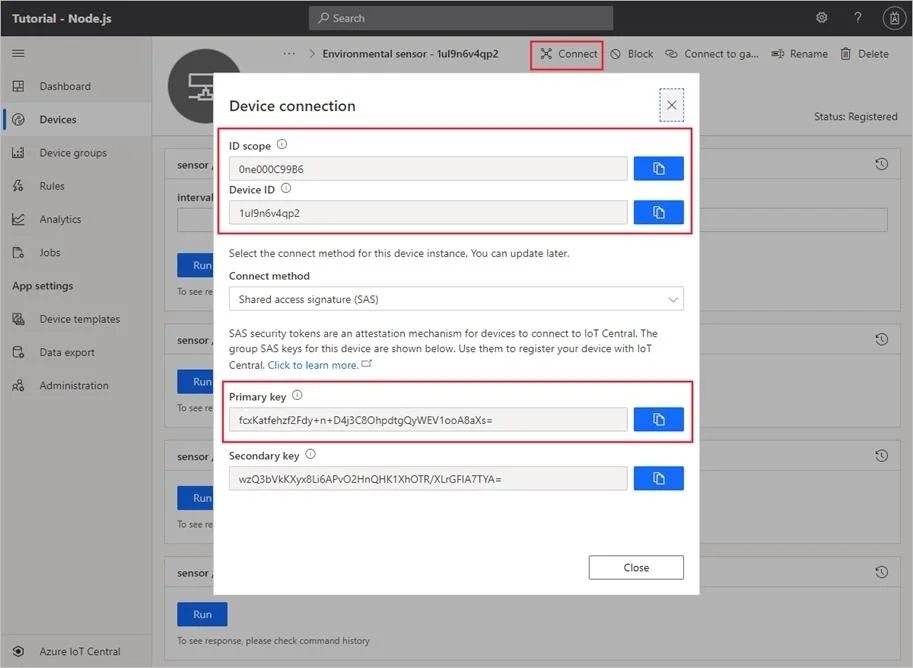
You have an Azure IoT Central application. You need to connect an IoT device to the application. Which two settings do you require in IoT Central to configure the device? Each correct answer…
The correct answer is C. Scope ID E. Device ID. In your Azure IoT Central application, add a real device to the device template 1. On the Devices page, select the Environmental sensor device template. 2. Select + New. 3. Make sure that Simulated is Off. Then select Create. Click on the device name, and then select Connect…
Question
Exhibit
Options
- AGroup SAS Primary Key
- Bthe IoT hub name
- CScope ID
- DApplication Name
- EDevice ID
How the community answered
(22 responses)- A5% (1)
- B9% (2)
- C82% (18)
- D5% (1)
Explanation
In your Azure IoT Central application, add a real device to the device template 1. On the Devices page, select the Environmental sensor device template. 2. Select + New. 3. Make sure that Simulated is Off. Then select Create. Click on the device name, and then select Connect. Make a note of the device connection information on the Device Connection page -ID scope, Device ID, and Primary key. You need these values when you create your device code: https://docs.microsoft.com/bs-cyrl-ba/azure/iot-central/core/tutorial-connect-device-python
Topics
Community Discussion
No community discussion yet for this question.