
AZ-220 · Question #1
Case Study 1 - Contoso Overview A company named Contoso, Ltd. is creating a building monitoring system that will monitor the temperature, humidity, and light level at various points in a building's…
The correct answer is D. Enable the collection of the Connections diagnostics logs and set up alerts for the connected. Scenario: You discover connectivity issues between the IoT gateway devices and iothub1, which cause IoT devices to lose connectivity and messages. To log device connection events and errors, turn on diagnostics for IoT Hub. We recommend turning on these logs as early as…
Question
Exhibit
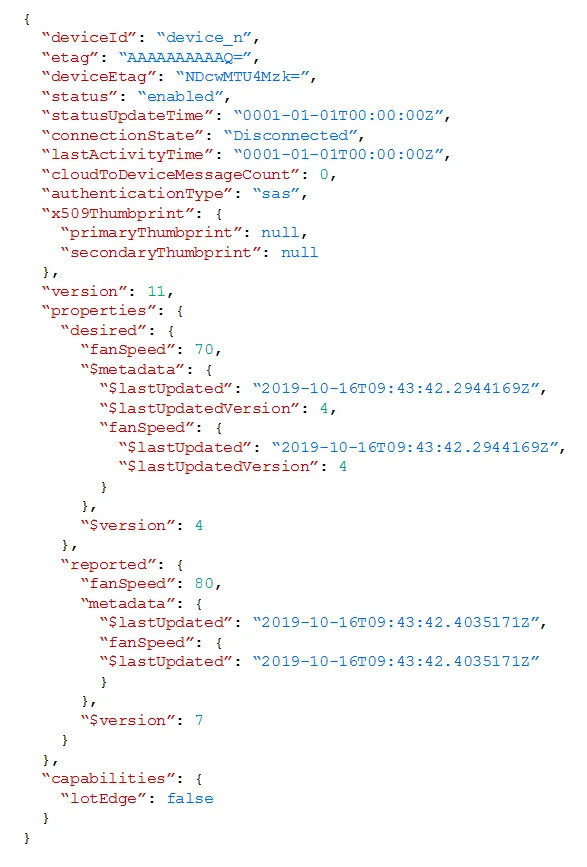
Options
- ASend cloud-to-device messages to the IoT devices.
- BUse the heartbeat pattern to send messages from the IoT devices to iothub1.
- CMonitor the connection status of the device twin by using an Azure function.
- DEnable the collection of the Connections diagnostics logs and set up alerts for the connected
How the community answered
(23 responses)- A9% (2)
- B4% (1)
- C4% (1)
- D83% (19)
Explanation
Scenario: You discover connectivity issues between the IoT gateway devices and iothub1, which cause IoT devices to lose connectivity and messages. To log device connection events and errors, turn on diagnostics for IoT Hub. We recommend turning on these logs as early as possible, because if diagnostic logs aren't enabled, when device disconnects occur, you won't have any information to troubleshoot the problem with. 1. Sign in to the Azure portal. 2. Browse to your IoT hub. 3. Select Diagnostics settings. 4. Select Turn on diagnostics. 5. Enable Connections logs to be collected. 6. For easier analysis, turn on Send to Log Analytics (see pricing). Set up alerts for device disconnect at scale To get alerts when devices disconnect, configure alerts on the Connected devices (preview) https://docs.microsoft.com/bs-cyrl-ba/azure/iot-hub/iot-hub-troubleshoot-connectivity
Topics
Community Discussion
No community discussion yet for this question.