
AZ-204 · Question #640
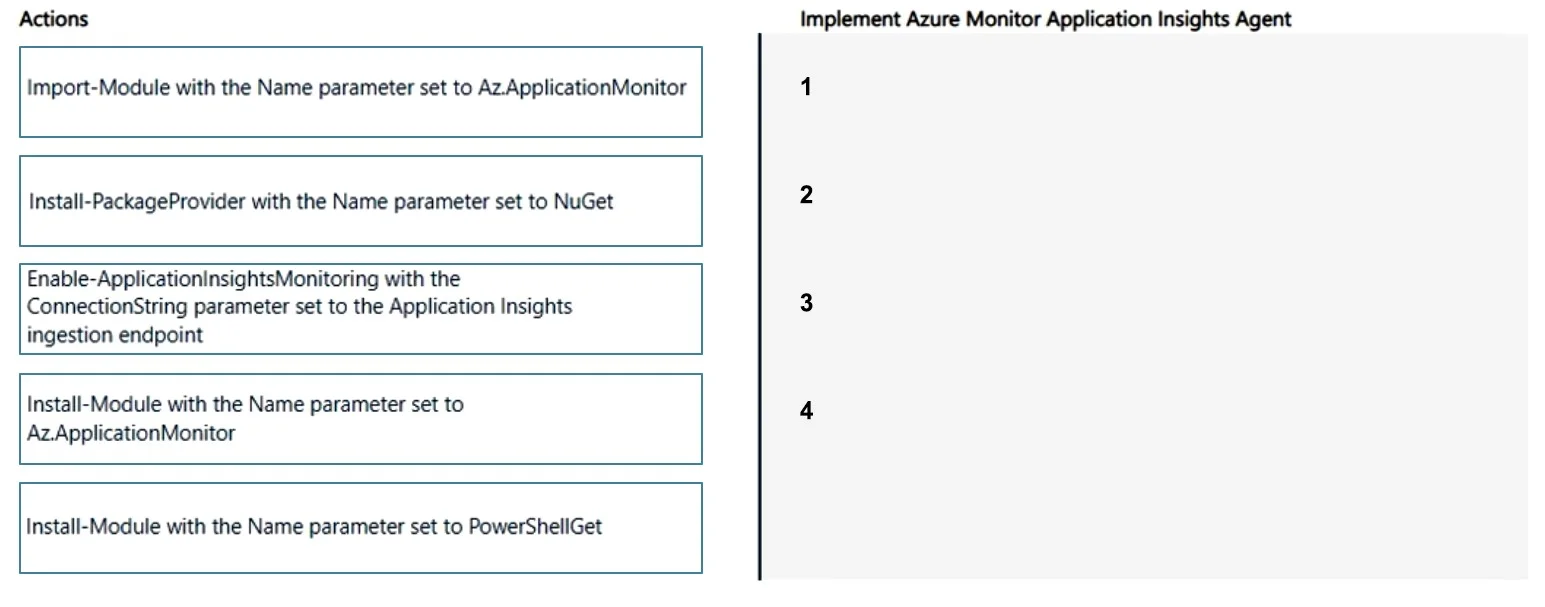
Drag and Drop Question You have an on-premises datacenter and an Azure subscription that contains an Azure Application Insights instance. You plan to implement Azure Monitor Application Insights…
The correct answer is Install-PackageProvider with the Name parameter set to NuGet; Install-Module with the Name parameter set to PowerShellGet; Install-Module with the Name parameter set to Az.ApplicationMonitor; Enable-ApplicationInsightsMonitoring with the ConnectionString parameter set to the Application Insights ingestion endpoint. To automate Azure Monitor Application Insights Agent installation via PowerShell, you must follow a specific dependency chain: first install the NuGet package provider (Install-PackageProvider with NuGet) which is required to download modules from the PowerShell Gallery, then…
Question
Exhibit
Answer Area
Drag items
Correct arrangement
- Install-PackageProvider with the Name parameter set to NuGet
- Install-Module with the Name parameter set to PowerShellGet
- Install-Module with the Name parameter set to Az.ApplicationMonitor
- Enable-ApplicationInsightsMonitoring with the ConnectionString parameter set to the Application Insights ingestion endpoint
Explanation
To automate Azure Monitor Application Insights Agent installation via PowerShell, you must follow a specific dependency chain: first install the NuGet package provider (Install-PackageProvider with NuGet) which is required to download modules from the PowerShell Gallery, then install the Az.ApplicationMonitor module (Install-Module with Az.ApplicationMonitor), then import it into the session (Import-Module with Az.ApplicationMonitor), and finally enable monitoring (Enable-ApplicationInsightsMonitoring with the ConnectionString parameter pointing to the Application Insights ingestion endpoint). This sequence ensures all prerequisites are met before instrumentation is applied to the on-premises web apps.
Topics
Community Discussion
No community discussion yet for this question.