
AZ-204 · Question #586
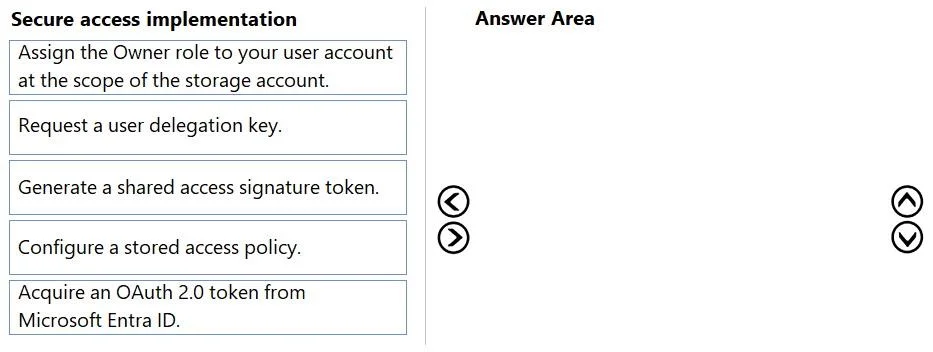
Drag and Drop Question You manage an Azure subscription associated with a Microsoft Entra tenant named contoso.com. The subscription contains an Azure Blob Storage account named storage1. Your user…
The correct answer is Acquire an OAuth 2.0 token from Microsoft Entra ID.; Request a user delegation key.; Generate a shared access signature token.; Configure a stored access policy. Explanation Quick Note on the Answer Key The question asks for three actions, but the "Correct Arrangement" lists four items. Item 4 - Configure a stored access policy - is incorrect and should not be included. The actual correct three-step sequence is items 1-3. This appears…
Question
Exhibit
Answer Area
Drag items
Correct arrangement
- Acquire an OAuth 2.0 token from Microsoft Entra ID.
- Request a user delegation key.
- Generate a shared access signature token.
- Configure a stored access policy.
Explanation
Explanation
Quick Note on the Answer Key
The question asks for three actions, but the "Correct Arrangement" lists four items. Item 4 - Configure a stored access policy - is incorrect and should not be included. The actual correct three-step sequence is items 1-3. This appears to be an error in the answer key provided.
The Correct Three Steps (and Why)
The requirements demand:
- Entra-authenticated authorization (rules out storage account key-based SAS)
- Arbitrary time limits set at request time (rules out stored access policies)
- Least privilege (rules out elevating to Owner)
This describes a User Delegation SAS - a SAS token signed with an Entra-backed key rather than a storage account key.
Step-by-Step Breakdown
Step 1 - Acquire an OAuth 2.0 token from Microsoft Entra ID
You must authenticate with Entra before anything else. The OAuth 2.0 token proves your identity to Azure and is the prerequisite for the next step. Without it, you cannot call the User Delegation Key API. This satisfies the requirement that access is authenticated by Entra credentials.
Step 2 - Request a user delegation key
Using the OAuth token from Step 1, you call the Azure Storage API (GetUserDelegationKey) to obtain a user delegation key (valid up to 7 days). This key is tied to your Entra identity - it's what makes the resulting SAS "Entra-backed" rather than storage-key-backed. You cannot do this step before acquiring the OAuth token.
Step 3 - Generate a shared access signature token
You use the user delegation key to sign a SAS token with whatever start time, expiry time, and permissions you specify at the moment of request (arbitrary values). The resulting SAS URL grants time-limited access to a container or blob. Least privilege is satisfied because you only grant the permissions needed for each specific request.
Why the Other Items Are Wrong
| Item | Why It's Excluded |
|---|---|
| Assign Owner role | You already have Contributor. Elevating to Owner violates least privilege. Contributor has the generateUserDelegationKey action needed. |
| Configure a stored access policy | Stored access policies define pre-set, fixed constraints and are used with service SAS (key-based), not user delegation SAS. They contradict the "arbitrary values at request time" requirement. |
Common Misconceptions
- "You need Owner to generate a user delegation key" - False. Contributor includes the necessary
Microsoft.Storage/storageAccounts/blobServices/generateUserDelegationKeypermission. - "A stored access policy makes the SAS more secure, so it should be included" - Stored access policies are incompatible with user delegation SAS and would lock in fixed expiry times, violating the arbitrary-values requirement.
- "Just use a service SAS with a storage account key" - This fails requirement 1, since it authenticates via storage keys, not Entra credentials.
Topics
Community Discussion
No community discussion yet for this question.