nerdexam
Microsoft

AZ-204 · Question #560

Drag and Drop Question You have two Azure Container Registry (ACR) instances: ACR01 and ACR02. You plan to implement a containerized application named APP1 that will use a base image named BASE1…

The correct answer is az acr build; az acr task create; az role assignment create; az acr task credential add; az acr task run. Azure ACR Task Automation - Ordered Explanation The Goal Build APP1 (stored in ACR01) using BASE1 (stored in ACR02) as its base image, with automatic rebuilds of APP1 whenever BASE1 is updated. This requires cross-registry authentication setup. --- Step-by-Step Breakdown 1. az…

Submitted by minji_kr· Mar 30, 2026Develop Azure compute solutions

Question

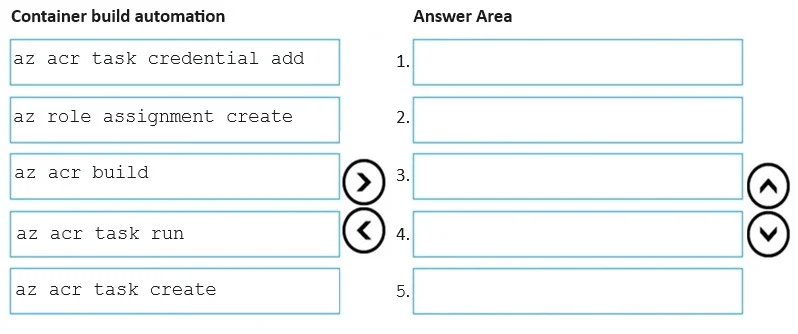
Drag and Drop Question You have two Azure Container Registry (ACR) instances: ACR01 and ACR02. You plan to implement a containerized application named APP1 that will use a base image named BASE1. The image for APP1 will be stored in ACR01. The image BASE1 will be stored in ACR02. You need to automate the planned implementation by using a sequence of five Azure command- line interface (Azure CLI) commands. Your solution must ensure that the APP1 image stored in ACR01 will be automatically updated when the BASE1 image is updated. In which order should you perform the actions? To answer, move all container build automation options from the list of container build automations to the answer area and arrange them in the correct order. NOTE: More than one order of answer choices is correct. You will receive credit for any of the correct orders you select. Answer:

Exhibit
AZ-204 question #560 exhibit

Answer Area

Drag items

az acr task credential addaz role assignment createaz acr buildaz acr task runaz acr task create

Correct arrangement

  • az acr build
  • az acr task create
  • az role assignment create
  • az acr task credential add
  • az acr task run

Explanation

Azure ACR Task Automation - Ordered Explanation

The Goal

Build APP1 (stored in ACR01) using BASE1 (stored in ACR02) as its base image, with automatic rebuilds of APP1 whenever BASE1 is updated. This requires cross-registry authentication setup.


Step-by-Step Breakdown

1. az acr build Purpose: Build and push the BASE1 image into ACR02.

BASE1 must physically exist in ACR02 before anything else can reference it. This is a prerequisite - the task you create in step 2 will reference BASE1 by its registry URL, and the auto-trigger system needs a real image to track.

Common mistake: Skipping this and assuming BASE1 already exists. On an exam, assume you're starting from scratch unless told otherwise.


2. az acr task create Purpose: Create the ACR Task in ACR01 that defines how APP1 is built and sets up the BASE1 change trigger.

The task definition specifies:

  • The Dockerfile / build context for APP1
  • The source registry (ACR02) for BASE1
  • A --base-image-trigger-enabled true trigger so APP1 rebuilds automatically when BASE1 updates

The task must exist before you can add credentials to it (step 4) or run it (step 5).

Common mistake: Thinking the trigger is set up separately. The trigger is baked into az acr task create.


3. az role assignment create Purpose: Grant ACR01's system-assigned managed identity the AcrPull role on ACR02.

Since ACR01 and ACR02 are different registries, the task running in ACR01 needs Azure RBAC permission to pull images from ACR02. Without this role assignment, any cross-registry pull will be denied at the Azure platform level.

Common mistake: Confusing this with step 4. Role assignment = Azure RBAC permission (platform-level). Credential add = task-level auth config. Both are required.


4. az acr task credential add Purpose: Tell the ACR Task explicitly which credentials to use when connecting to ACR02.

Even after the role assignment, the task needs to be configured to present those credentials when pulling from ACR02. This command links the task to the managed identity token or credential set for ACR02. It must follow task creation (step 2) because it operates on an existing task.

Common mistake: Assuming the role assignment alone is sufficient. Without this step, the task doesn't know to use the managed identity for the external registry - it will fail to authenticate.


5. az acr task run Purpose: Manually trigger the task to validate the full setup.

This is the verification step - it forces an immediate run to confirm that the task can successfully pull BASE1 from ACR02 and build APP1 into ACR01. In production, subsequent runs are triggered automatically by BASE1 updates.

Common mistake: Treating this as optional. On the exam it's listed as one of the five required steps, making it mandatory for the initial validation run.


Why "More Than One Order Is Correct"

Steps 3 and 4 (role assignment and credential add) are independent of each other and can be swapped - neither depends on the other's completion. Similarly, step 3 could technically precede step 2. The exam acknowledges these valid permutations.

The hard constraints are:

  • Step 1 (az acr build) must come first - BASE1 must exist
  • Step 2 (az acr task create) must precede steps 4 and 5 - the task must exist
  • Step 5 (az acr task run) must come last - everything must be configured first

Topics

#Azure Container Registry#ACR Tasks#Base Image Updates#Azure CLI

Community Discussion

No community discussion yet for this question.

Full AZ-204 Practice