
Microsoft
AZ-204 · Question #324
Case Study 5 - Wide World Importers Background Wide World Importers is moving all their datacenters to Azure. The company has developed several applications and services to support supply chain…
Sign in or unlock AZ-204 to reveal the answer and full explanation for question #324. The question stem and answer options stay visible for context.
Submitted by fernanda_arg· Mar 30, 2026Design and implement application integration solutions using Azure Logic Apps and integration accounts for B2B enterprise workflows
Question
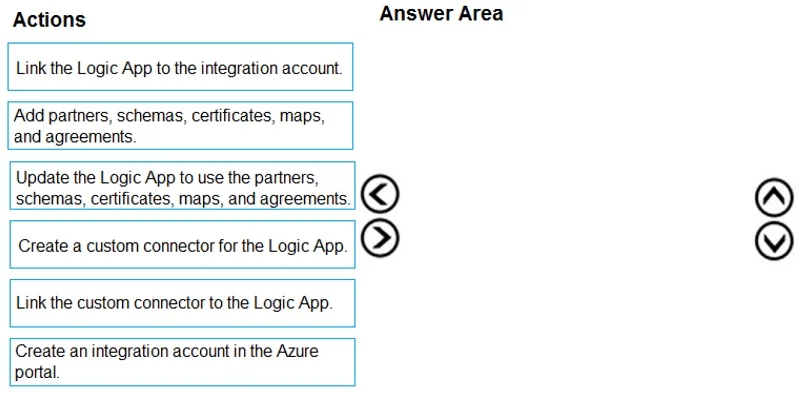
Case Study 5 - Wide World Importers Background Wide World Importers is moving all their datacenters to Azure. The company has developed several applications and services to support supply chain operations and would like to leverage serverless computing where possible. Current environment Windows Server 2016 virtual machine This virtual machine (VM) runs Biz Talk Server 2016. The VM runs the following workflows: Ocean Transport - This workflow gathers and validates container information including container contents and arrival notices at various shipping ports. Inland Transport - This workflow gathers and validates trucking information including fuel usage, number of stops, and routes. The VM supports the following REST API calls: Container API - This API provides container information including weight, contents, and other attributes. Location API - This API provides location information regarding shipping ports of call and truck stops. Shipping REST API - This API provides shipping information for use and display on the shipping website. Shipping Data The application uses MongoDB JSON document storage database for all container and transport information. Shipping Web Site The site displays shipping container tracking information and container contents. The site is Proposed solution The on-premises shipping application must be moved to Azure. The VM has been migrated to a new Standard_D16s_v3 Azure VM by using Azure Site Recovery and must remain running in Azure to complete the BizTalk component migrations. You create a Standard_D16s_v3 Azure VM to host BizTalk Server. The Azure architecture diagram for the proposed solution is shown below: Shipping Logic App The Shipping Logic app must meet the following requirements: Support the ocean transport and inland transport workflows by using a Logic App. Support industry-standard protocol X12 message format for various messages including vessel content details and arrival notices. Secure resources to the corporate VNet and use dedicated storage resources with a fixed costing model. Maintain on-premises connectivity to support legacy applications and final BizTalk migrations. Shipping Function app Implement secure function endpoints by using app-level security and include Azure Active Directory (Azure AD). REST APIs The REST API's that support the solution must meet the following requirements: Secure resources to the corporate VNet. Allow deployment to a testing location within Azure while not incurring additional costs. Automatically scale to double capacity during peak shipping times while not causing application downtime. Minimize costs when selecting an Azure payment model. Shipping data Data migration from on-premises to Azure must minimize costs and downtime. Shipping website Use Azure Content Delivery Network (CDN) and ensure maximum performance for dynamic content while minimizing latency and costs. Issues Windows Server 2016 VM The VM shows high network latency, jitter, and high CPU utilization. The VM is critical and has not been backed up in the past. The VM must enable a quick restore from a 7-day snapshot to include in-place restore of disks in case of failure. Shipping website and REST APIs The following error message displays while you are testing the website: Drag and Drop Question You need to support the message processing for the ocean transport workflow. Which four actions should you perform in sequence? To answer, move the appropriate actions from the list of actions to the answer area and arrange them in the correct order. Answer:
Exhibit
Answer Area
Drag items
Link the Logic App to the integration account.Add partners, schemas, certificates, maps, and agreements.Update the Logic App to use the partners, schemas, certificates, maps, and agreements.Create a custom connector for the Logic App.Link the custom connector to the Logic App.Create an integration account in the Azure portal.
Unlock AZ-204 to see the answer
You've previewed enough free AZ-204 questions. Unlock AZ-204 for full answers, explanations, the timed quiz mode, progress tracking, and the master PDF. Question stem and options stay visible so you can still see what's on the exam.
Topics
#Azure Logic Apps#Integration Account#B2B Integration#BizTalk Migration