
Microsoft
AZ-204 · Question #295
Drag and Drop Question You are a developer for a company that provides a bookings management service in the tourism industry. You are implementing Azure Search for the tour agencies listed in your…
Sign in or unlock AZ-204 to reveal the answer and full explanation for question #295. The question stem and answer options stay visible for context.
Submitted by viktor_hu· Mar 30, 2026Implement Azure Search - specifically using the Azure Search .NET SDK to index and upload documents into an Azure Search index using the push model.
Question
Drag and Drop Question You are a developer for a company that provides a bookings management service in the tourism industry. You are implementing Azure Search for the tour agencies listed in your company's solution. You create the index in Azure Search. You now need to use the Azure Search .NET SDK to import the relevant data into the Azure Search service. Which three actions should you perform in sequence? To answer, move the appropriate actions from the list of actions from left to right and arrange them in the correct order. Answer:
Exhibit
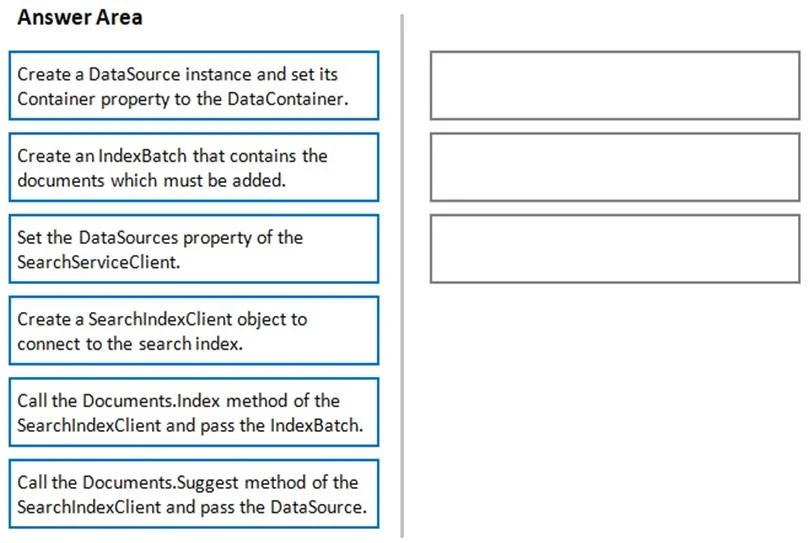
Answer Area
Drag items
Create a DataSource instance and set its Container property to the DataContainer.Create an IndexBatch that contains the documents which must be added.Set the DataSources property of the SearchServiceClient.Create a SearchIndexClient object to connect to the search index.Call the Documents.Index method of the SearchIndexClient and pass the IndexBatch.Call the Documents.Suggest method of the SearchIndexClient and pass the DataSource.
Unlock AZ-204 to see the answer
You've previewed enough free AZ-204 questions. Unlock AZ-204 for full answers, explanations, the timed quiz mode, progress tracking, and the master PDF. Question stem and options stay visible so you can still see what's on the exam.
Topics
#Azure Search#Azure Cognitive Search SDK#Document Indexing#Push Model Indexing