
AZ-204 · Question #29
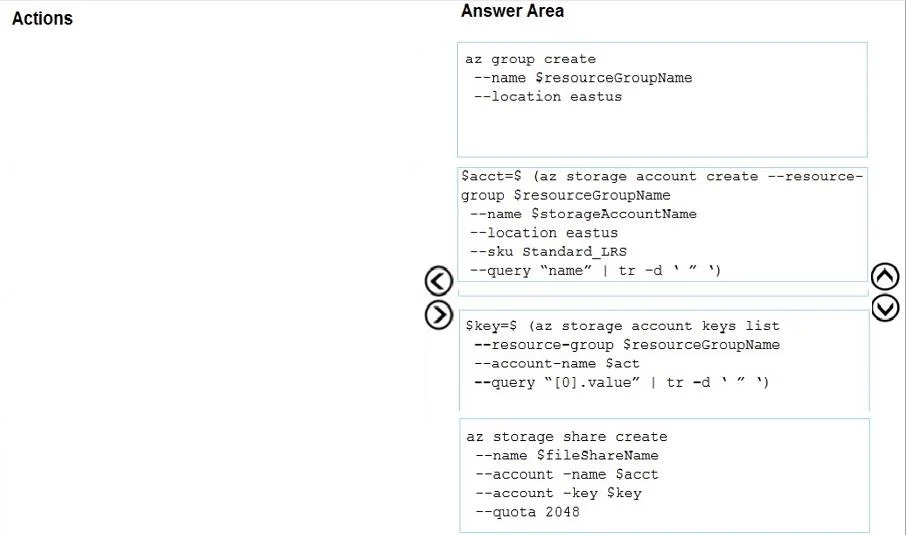
Drag and Drop Question You have an Azure subscription. You must create a file share with a quota of 2,048 GB. You create the following variables: In which order should you arrange the Azure CLI…
The correct answer is az group create --name $resourceGroupName --location eastus; $sacc=$(az storage account create --resource-group $resourceGroupName --name $storageAccountName --location eastus --sku Standard_LRS --query "name" | tr -d '"'); $key=$(az storage account keys list --resource-group $resourceGroupName --account-name $sacc --query "[0].value" | tr -d '"'); az storage share create --name $fileShareName --account-name $sacc --account-key $key --quota 2048. Azure File Share Creation - Command Order Explained The ordering follows a strict dependency chain: each command produces a value or resource that the next command requires. --- Step 1: az group create --name $resourceGroupName --location eastus Why first: A resource group is…
Question
Exhibit
Answer Area
Drag items
Correct arrangement
- az group create --name $resourceGroupName --location eastus
- $sacc=$(az storage account create --resource-group $resourceGroupName --name $storageAccountName --location eastus --sku Standard_LRS --query "name" | tr -d '"')
- $key=$(az storage account keys list --resource-group $resourceGroupName --account-name $sacc --query "[0].value" | tr -d '"')
- az storage share create --name $fileShareName --account-name $sacc --account-key $key --quota 2048
Explanation
Azure File Share Creation - Command Order Explained
The ordering follows a strict dependency chain: each command produces a value or resource that the next command requires.
Step 1: az group create --name $resourceGroupName --location eastus
Why first: A resource group is the logical container for all Azure resources. Nothing else can be created without one. This command has no dependencies - it only relies on the $resourceGroupName variable, which is pre-defined. Every subsequent command references this resource group.
Step 2: $sacc=$(az storage account create ... --query "name" | tr -d '"')
Why second: A storage account must exist before you can create a file share or retrieve keys. This command:
- Depends on the resource group from Step 1
- Captures the storage account name into
$sacc(stripping quotes withtr -d '"') $saccis required by both Step 3 and Step 4
Common mistake: Trying to create the storage account before the resource group exists causes an immediate failure - the --resource-group flag references a non-existent group.
Step 3: $key=$(az storage account keys list ... --query "[0].value" | tr -d '"')
Why third: You cannot retrieve keys for a storage account that doesn't exist yet. This command:
- Depends on
$saccfrom Step 2 - Retrieves the first access key and stores it in
$key $keyis required to authenticate the file share creation in Step 4
Common mistake: Swapping Steps 3 and 4 - you cannot create the file share without the key for authentication.
Step 4: az storage share create --name $fileShareName --account-name $sacc --account-key $key --quota 2048
Why last: This is the goal of the entire sequence. It depends on:
$sacc(storage account name) - from Step 2$key(access key) - from Step 3- The
--quota 2048flag sets the 2,048 GB limit as required
Summary: The Dependency Chain
Resource Group -> Storage Account ($sacc) -> Storage Key ($key) -> File Share
Each step unlocks the next. No step can be reordered without breaking a dependency.
Topics
Community Discussion
No community discussion yet for this question.