
AZ-204 · Question #236
Drag and Drop Question You are developing a web service that will run on Azure virtual machines that use Azure Storage. You configure all virtual machines to use managed identities. You have the…
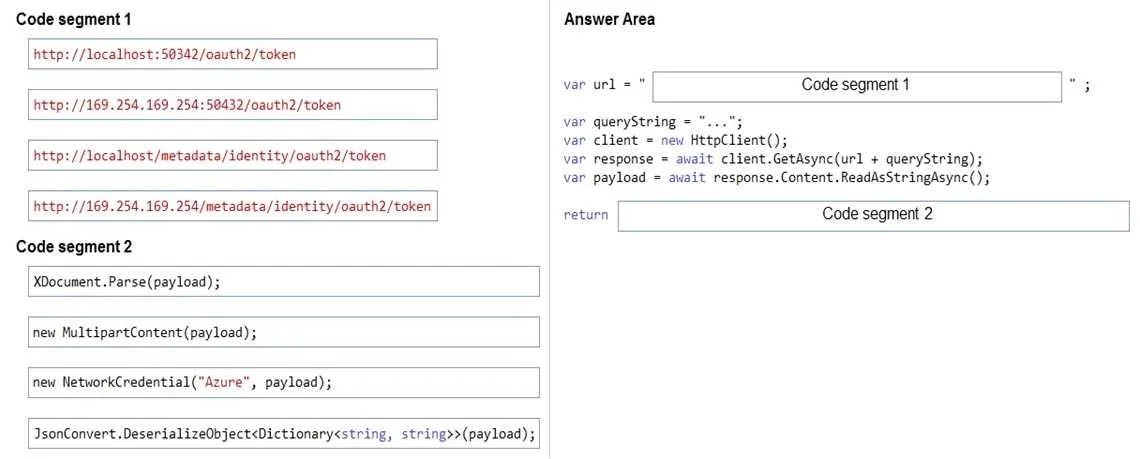
The correct answer is http://169.254.169.254/metadata/identity/oauth2/token; JsonConvert.DeserializeObject<Dictionary<string, string>>(payload). Azure Managed Identity Token Retrieval - Explanation Context When VMs use managed identities, they authenticate to Azure services without secrets (no passwords, connection strings, or keys). The token is fetched from the Azure Instance Metadata Service (IMDS), which is a local…
Question
Exhibit
Answer Area
Drag items
Correct arrangement
- http://169.254.169.254/metadata/identity/oauth2/token
- JsonConvert.DeserializeObject<Dictionary<string, string>>(payload);
Explanation
Azure Managed Identity Token Retrieval - Explanation
Context
When VMs use managed identities, they authenticate to Azure services without secrets (no passwords, connection strings, or keys). The token is fetched from the Azure Instance Metadata Service (IMDS), which is a local HTTP endpoint only accessible from within the VM.
Placement 1: http://169.254.169.254/metadata/identity/oauth2/token
Why this URL?
169.254.169.254 is the well-known link-local IP address for the Azure Instance Metadata Service (IMDS). The correct path for managed identity token requests is /metadata/identity/oauth2/token.
The full request looks like:
GET http://169.254.169.254/metadata/identity/oauth2/token
    ?api-version=2018-02-01
    &resource=https://storage.azure.com/
Headers: Metadata: true
Why the others are wrong:
http://localhost:50342/oauth2/token- This was the old Azure Instance Metadata Service endpoint used by the legacy VM extension (IMDS v1/MSI extension). It is deprecated and no longer the correct approach.http://169.254.169.254/oauth2/token- Missing the/metadata/identitypath segment. This is not a valid IMDS endpoint.http://localhost/metadata/identity/oauth2/token- Useslocalhostinstead of the IMDS IP. IMDS is not served on localhost; it requires the specific link-local address.
Placement 2: JsonConvert.DeserializeObject<Dictionary<string, string>>(payload)
Why this deserializer?
The IMDS endpoint returns a JSON response containing the access token and related fields:
{
  "access_token": "eyJ0...",
  "expires_in": "3599",
  "token_type": "Bearer",
  ...
}
JsonConvert.DeserializeObject<Dictionary<string, string>>(payload) (from Newtonsoft.Json) correctly parses this JSON string into a key-value dictionary, from which you'd extract payload["access_token"].
Why the others are wrong:
XDocument.Parse(payload)- Parses XML, not JSON. IMDS returns JSON.new MultipartContent(payload)- Used for constructing HTTP multipart form bodies. Has nothing to do with parsing a response.new NetworkCredential("Azure", payload)- Used for username/password credentials, which directly violates the requirement that secret-based authentication is not permitted.
Common Misconceptions
| Mistake | Why it's wrong |
|---|---|
Using localhost:50342 | That's the deprecated MSI VM extension endpoint, not modern IMDS |
| Thinking IMDS returns XML | It always returns JSON |
Using NetworkCredential | That's secret-based auth - explicitly prohibited by the requirements |
Omitting the Metadata: true header | IMDS requires this header; without it, the request is rejected to prevent SSRF attacks |
Topics
Community Discussion
No community discussion yet for this question.