
Microsoft
AZ-204 · Question #224
Drag and Drop Question You are maintaining an existing application that uses an Azure Blob GPv1 Premium storage account. Data older than three months is rarely used. Data newer than three months…
Sign in or unlock AZ-204 to reveal the answer and full explanation for question #224. The question stem and answer options stay visible for context.
Submitted by tunde_lagos· Mar 30, 2026Implement and Manage Storage in Azure - specifically configuring blob storage lifecycle management, understanding storage account types (GPv1, GPv2, Premium vs Standard), and data archiving strategies for cost optimization.
Question
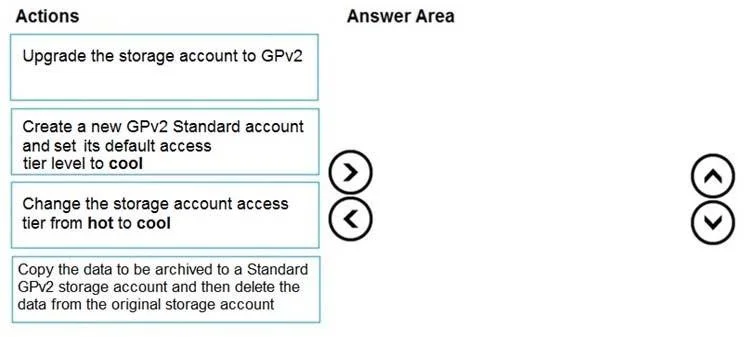
Drag and Drop Question You are maintaining an existing application that uses an Azure Blob GPv1 Premium storage account. Data older than three months is rarely used. Data newer than three months must be available immediately. Data older than a year must be saved but does not need to be available immediately. You need to configure the account to support a lifecycle management rule that moves blob data to archive storage for data not modified in the last year. Which three actions should you perform in sequence? To answer, move the appropriate actions from the list of actions to the answer area and arrange them in the correct order. Answer:
Exhibit
Answer Area
Drag items
Upgrade the storage account to GPv2Create a new GPv2 Standard account and set its default access tier level to coolChange the storage account access tier from hot to coolCopy the data to be archived to a Standard GPv2 storage account and then delete the data from the original storage account
Unlock AZ-204 to see the answer
You've previewed enough free AZ-204 questions. Unlock AZ-204 for full answers, explanations, the timed quiz mode, progress tracking, and the master PDF. Question stem and options stay visible so you can still see what's on the exam.
Topics
#Azure Blob Storage#Lifecycle Management Policies#Storage Account Tiers#GPv2 Storage Migration