
Microsoft
AZ-204 · Question #208
Drag and Drop Question You have an application that uses Azure Blob storage. You need to update the metadata of the blobs. Which three methods should you use to develop the solution? To answer, move…
Sign in or unlock AZ-204 to reveal the answer and full explanation for question #208. The question stem and answer options stay visible for context.
Submitted by yasin.bd· Mar 30, 2026Develop solutions that use Azure Blob storage - specifically implementing blob storage operations including reading, updating, and managing blob metadata and properties using the Azure Storage client library.
Question
Drag and Drop Question You have an application that uses Azure Blob storage. You need to update the metadata of the blobs. Which three methods should you use to develop the solution? To answer, move the appropriate methods from the list of methods to the answer area and arrange them in the correct order. Answer:
Exhibit
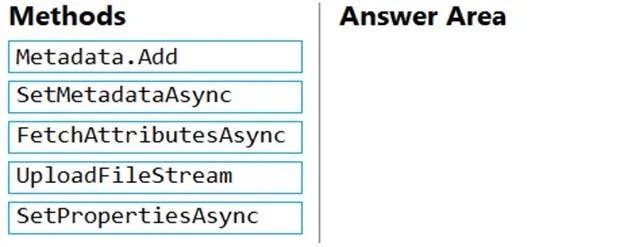
Answer Area
Drag items
Metadata.AddSetMetadataAsyncFetchAttributesAsyncUploadFileStreamSetPropertiesAsync
Unlock AZ-204 to see the answer
You've previewed enough free AZ-204 questions. Unlock AZ-204 for full answers, explanations, the timed quiz mode, progress tracking, and the master PDF. Question stem and options stay visible so you can still see what's on the exam.
Topics
#Azure Blob Storage#Blob Metadata#Azure Storage SDK#Blob Properties