
AZ-204 · Question #164
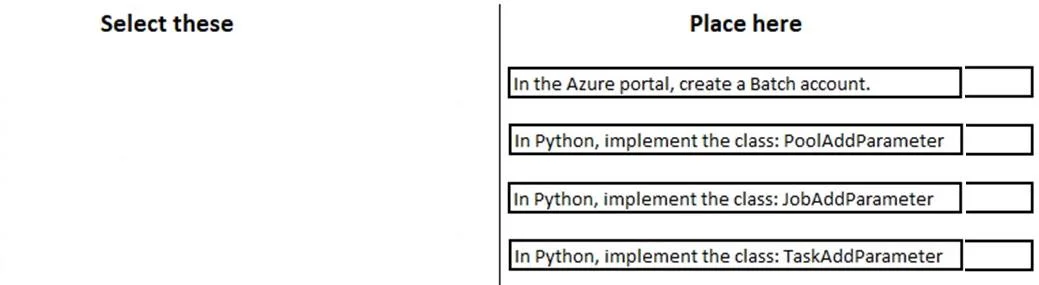
Drag and Drop Question You are developing a software solution for an autonomous transportation system. The solution uses large data sets and Azure Batch processing to simulate navigation sets for…
The correct answer is In the Azure portal, create a Batch account; In a .NET method, call the method: BatchClient.PoolOperations.CreatePool; In a .NET method, call the method: BatchClient.PoolOperations.CreateJob; In a .NET method, call the method: BatchClient.JobOperations.AddTask. To create compute nodes in Azure Batch, you must follow a specific sequence: first create a Batch account in the Azure portal (the foundational resource), then create a Pool using BatchClient.PoolOperations.CreatePool (pools contain the compute nodes), and finally create a Job…
Question
Exhibit
Answer Area
Drag items
Correct arrangement
- In the Azure portal, create a Batch account
- In a .NET method, call the method: BatchClient.PoolOperations.CreatePool
- In a .NET method, call the method: BatchClient.PoolOperations.CreateJob
- In a .NET method, call the method: BatchClient.JobOperations.AddTask
Explanation
To create compute nodes in Azure Batch, you must follow a specific sequence: first create a Batch account in the Azure portal (the foundational resource), then create a Pool using BatchClient.PoolOperations.CreatePool (pools contain the compute nodes), and finally create a Job using BatchClient.PoolOperations.CreateJob (jobs run on the pool's compute nodes). This three-step sequence is mandatory because each resource depends on the previous one - compute nodes live inside pools, which live inside Batch accounts.
Topics
Community Discussion
No community discussion yet for this question.