
AZ-204 · Question #112
Case Study 5 - Wide World Importers Background Wide World Importers is moving all their datacenters to Azure. The company has developed several applications and services to support supply chain…
The correct answer is D. On-premises Data Gateway. Before you can connect to on-premises data sources from Azure Logic Apps, download and install the onpremises data gateway on a local computer. The gateway works as a bridge that provides quick data transfer and encryption between data sources on premises (not in the cloud) and…
Question
Exhibit
Options
- AAzure Active Directory Application Proxy
- BPoint-to-Site (P2S) VPN connection
- CSite-to-Site (S2S) VPN connection
- DOn-premises Data Gateway
How the community answered
(37 responses)- A3% (1)
- B8% (3)
- C5% (2)
- D84% (31)
Explanation
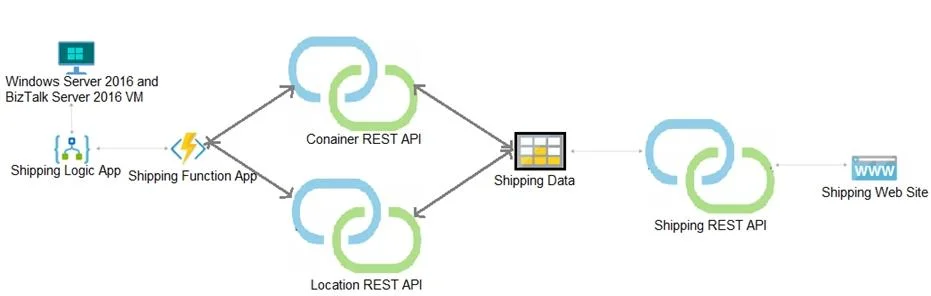
Before you can connect to on-premises data sources from Azure Logic Apps, download and install the onpremises data gateway on a local computer. The gateway works as a bridge that provides quick data transfer and encryption between data sources on premises (not in the cloud) and your logic apps. The gateway supports BizTalk Server 2016. Note: Microsoft have now fully incorporated the Azure BizTalk Services capabilities into Logic Apps and Azure App Service Hybrid Connections. Logic Apps Enterprise Integration pack bring some of the enterprise B2B capabilities like AS2 and X12, EDI standards support Scenario: The Shipping Logic app must meet the following requirements: Support the ocean transport and inland transport workflows by using a Logic App. Support industry standard protocol X12 message format for various messages including vessel content details and arrival notices. Secure resources to the corporate VNet and use dedicated storage resources with a fixed costing Maintain on-premises connectivity to support legacy applications and final BizTalk migrations. https://docs.microsoft.com/en-us/azure/logic-apps/logic-apps-gateway-install
Topics
Community Discussion
No community discussion yet for this question.