
AZ-140 · Question #311
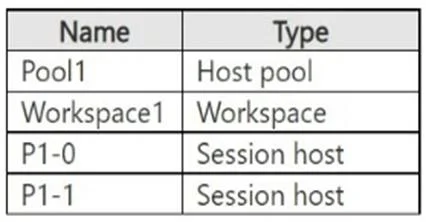
You have an Azure Virtual Desktop deployment that contains the resources shown in the following table. You need to ensure that users can connect to a session host in the deallocated state. On which…
The correct answer is D. Pool1 only. Enable or disable Start VM on Connect Once you assign the Desktop Virtualization Power On Contributor role to the service principal on relevant subscriptions, you can configure Start VM on Connect using the Azure portal, Azure PowerShell, or Azure CLI. To configure Start VM on…
Question
You have an Azure Virtual Desktop deployment that contains the resources shown in the following table. You need to ensure that users can connect to a session host in the deallocated state. On which resources can you enable Start VM on Connect?
Exhibit
Options
- AWorkspace1 only
- BAzure virtual machines
- CP1-0 and P1-1
- DPool1 only
How the community answered
(40 responses)- A8% (3)
- B3% (1)
- C5% (2)
- D85% (34)
Explanation
Enable or disable Start VM on Connect Once you assign the Desktop Virtualization Power On Contributor role to the service principal on relevant subscriptions, you can configure Start VM on Connect using the Azure portal, Azure PowerShell, or Azure CLI. To configure Start VM on Connect using the Azure portal: 1. Sign in to the Azure portal. 2. In the search bar, enter Azure Virtual Desktop and select the matching service entry. *-> 3. Select Host pools, then select the name of the host pool where you want to enable the 4. Select Properties. 5. In the configuration section, set Start VM on connect to Yes to enable it, or No to disable it. 6. Select Save to apply the settings. https://learn.microsoft.com/en-us/azure/virtual-desktop/start-virtual-machine-connect
Community Discussion
No community discussion yet for this question.