
AZ-140 · Question #207
You have an Azure Virtual Desktop deployment that contains a host pool named Pool1. Pool1 contains session hosts that are joined to a Microsoft Entra Domain Services managed domain. The domain…
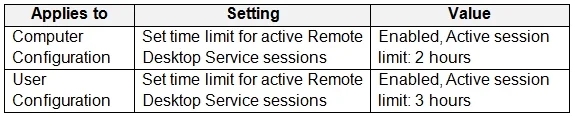
The correct answer is A. 2 hours. User1 will be disconnected after 2 hours because for Remote Desktop Services session limits, computer policy settings override user policy settings when both are configured.
Question
You have an Azure Virtual Desktop deployment that contains a host pool named Pool1. Pool1 contains session hosts that are joined to a Microsoft Entra Domain Services managed domain. The domain contains a user named User1. You configure AADDC Computers GPO as shown in the following table. You configure AADDC Users GPO as shown in the following table. How long after connecting to a session host will User1 be disconnected?
Exhibits

Options
- A2 hours
- B3 hours
- C6 hours
- D8 hours
How the community answered
(43 responses)- A72% (31)
- B7% (3)
- C2% (1)
- D19% (8)
Why each option
User1 will be disconnected after 2 hours because for Remote Desktop Services session limits, computer policy settings override user policy settings when both are configured.
When both computer and user policies are configured for Remote Desktop Services session time limits, the computer policy settings take precedence. The AADDC Computers GPO applies a 2-hour time limit for active but idle sessions to the session hosts, which overrides the 3-hour limit set in the AADDC Users GPO for User1. Therefore, User1 will be disconnected after 2 hours of idle activity.
This would be the correct duration if the User GPO took precedence, but for RDS session limits, computer policies generally override user policies.
Neither of the provided Group Policy Objects (GPOs) configure the session limit to 6 hours.
Neither of the provided Group Policy Objects (GPOs) configure the session limit to 8 hours.
Concept tested: Group Policy precedence for RDS session limits
Source: https://learn.microsoft.com/en-us/windows-server/remote/remote-desktop-services/rds-manage-gpo-settings
Topics
Community Discussion
No community discussion yet for this question.