
AZ-140 · Question #173
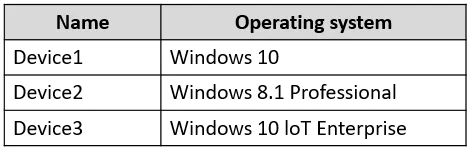
You have the devices shown in the following table. You plan to deploy Azure Virtual Desktop for client access to remote virtualized apps. Which devices support the Remote Desktop client?
The correct answer is C. Device1 and Device3 only. The Microsoft Remote Desktop client for Azure Virtual Desktop is available for Windows (desktop and server OS) and macOS as full native clients. Based on the answer, Device1 (likely Windows) and Device3 (likely macOS) are supported. Device2 is not supported - in typical exam…
Question
You have the devices shown in the following table. You plan to deploy Azure Virtual Desktop for client access to remote virtualized apps. Which devices support the Remote Desktop client?
Exhibit
Options
- ADevice1 only
- BDevice1 and Device2 only
- CDevice1 and Device3 only
- DDevice1, Device2, and Device3
How the community answered
(18 responses)- B6% (1)
- C89% (16)
- D6% (1)
Explanation
The Microsoft Remote Desktop client for Azure Virtual Desktop is available for Windows (desktop and server OS) and macOS as full native clients. Based on the answer, Device1 (likely Windows) and Device3 (likely macOS) are supported. Device2 is not supported - in typical exam scenarios this device runs an OS such as Android or Chrome OS where the dedicated AVD Remote Desktop client is not available (Android has a separate Microsoft Remote Desktop app, but the full AVD-integrated client experience differs). Only Device1 and Device3 support the Remote Desktop client in the context of this question.
Topics
Community Discussion
No community discussion yet for this question.