
AZ-140 · Question #139
You have an Azure Virtual Desktop deployment that contains a host pool. The pool has the following settings: - Resource group: RG1 - Host pool name: Pool1 - Location: East US - Host pool type…
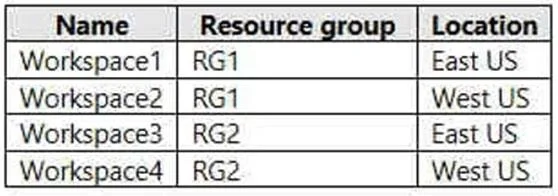
The correct answer is B. Workspace1 and Workspace3 only. You can only register the app group to workspaces created in the same location as the host pool. Also. if you've previously registered another app group from the same host pool as your new app group to a workspace, it will be selected and you can't edit it. All app groups from…
Question
You have an Azure Virtual Desktop deployment that contains a host pool. The pool has the following settings:
- Resource group: RG1
- Host pool name: Pool1
- Location: East US
- Host pool type: Pooled
The deployment contains the workspaces shown in the following table. For Pool1, you plan to create a RemoteApp application group named AppGroup1. In which workspaces can you register AppGroup1?
Exhibit
Options
- AWorkspace1 and Workspace2 only
- BWorkspace1 and Workspace3 only
- CWorkspace1 only
- DWorkspace1, Workspace2, Workspace3, and Workspace4
How the community answered
(34 responses)- A6% (2)
- B76% (26)
- C3% (1)
- D15% (5)
Explanation
You can only register the app group to workspaces created in the same location as the host pool. Also. if you've previously registered another app group from the same host pool as your new app group to a workspace, it will be selected and you can't edit it. All app groups from a host pool must be registered to the same workspace. https://docs.microsoft.com/en-us/azure/virtual-desktop/manage-app-groups
Topics
Community Discussion
No community discussion yet for this question.