
AZ-140 · Question #136
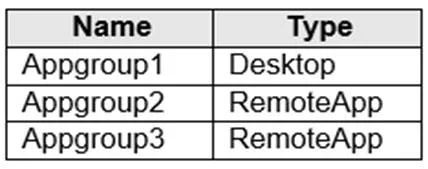
You have an Azure Virtual Desktop host pool named HostPool1. HostPool1 contains Windows 10 session hosts and the application groups shown in the following table. You need to assign an instance of a…
The correct answer is D. Create a new host pool. An AVD host pool's application groups are tied to the OS version of the session hosts in that pool. HostPool1 contains Windows 10 session hosts; a Windows 11 Desktop application group requires Windows 11 session hosts. You cannot mix different OS versions in an application…
Question
You have an Azure Virtual Desktop host pool named HostPool1. HostPool1 contains Windows 10 session hosts and the application groups shown in the following table. You need to assign an instance of a Windows 11 Desktop application group to users. What should you do first?
Exhibit
Options
- ACreate a scaling plan.
- BCreate a new workspace.
- CAdd a session host to HostPool1.
- DCreate a new host pool.
How the community answered
(46 responses)- B2% (1)
- C2% (1)
- D96% (44)
Explanation
An AVD host pool's application groups are tied to the OS version of the session hosts in that pool. HostPool1 contains Windows 10 session hosts; a Windows 11 Desktop application group requires Windows 11 session hosts. You cannot mix different OS versions in an application group within a single host pool in this way. Therefore, the first step is to create a new host pool configured with Windows 11 session hosts, after which you can create a Windows 11 Desktop application group within that new pool and assign it to users. Creating a scaling plan (A) or workspace (B) does not address the OS mismatch. Adding a session host to HostPool1 (C) would still be Windows 10 and cannot host a Windows 11 Desktop app group.
Topics
Community Discussion
No community discussion yet for this question.