
AZ-140 · Question #1
Case Study 1 - Contoso, Ltd Overview Contoso, Ltd. is a law firm that has a main office in Montreal and branch offices in Paris and Seattle. The Seattle branch office opened recently. Contoso has an…
The correct answer is D. storage1. Storage1 (D) is correct because the Seattle office RDS deployment is being migrated to the West US Azure region, and storage1 is the storage account located in West US - FSLogix profile containers must reside in the same Azure region as the session hosts to ensure low-latency…
Question
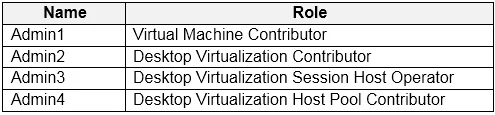
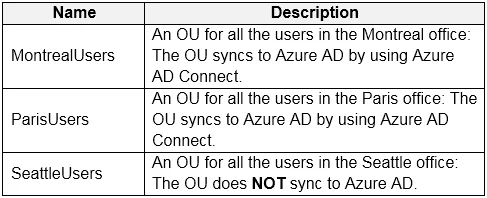
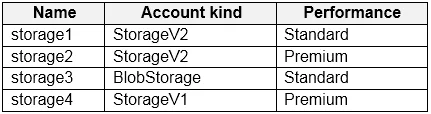
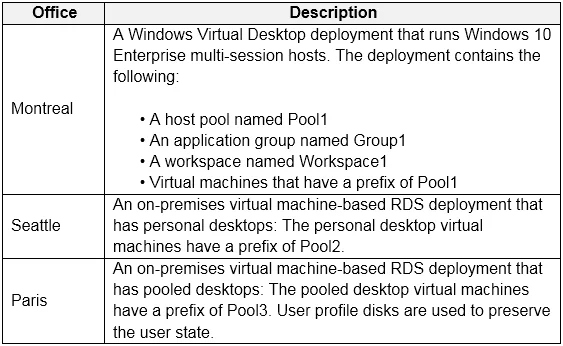
Case Study 1 - Contoso, Ltd Overview Contoso, Ltd. is a law firm that has a main office in Montreal and branch offices in Paris and Seattle. The Seattle branch office opened recently. Contoso has an Azure subscription and uses Microsoft 365. Existing Infrastructure. Active Directory The network contains an on-premises Active Directory domain named contoso.com and an Azure Active Directory (Azure AD) tenant. One of the domain controllers runs as an Azure virtual machine and connects to a virtual network named VNET1. All internal name resolution is provided by DNS server that run on the domain controllers. The on-premises Active Directory domain contains the organizational units (OUs) shown in the following table. The on-premises Active Directory domain contains the users shown in the following table. The Azure AD tenant contains the cloud-only users shown in the following table. Existing Infrastructure. Network Infrastructure All the Azure virtual networks are peered. The on-premises network connects to the virtual networks. All servers run Windows Server 2019. All laptops and desktop computers run Windows 10 Enterprise. Since users often work on confidential documents, all the users use their computer as a client for connecting to Remote Desktop Services (RDS). In the West US Azure region, you have the storage accounts shown in the following table. Existing Infrastructure. Remote Desktop Infrastructure Contoso has a Remote Desktop infrastructure shown in the following table. Requirements. Planned Changes Contoso plans to implement the following changes:
- Implement FSLogix profile containers for the Paris offices.
- Deploy a Azure Virtual Desktop host pool named Pool4.
- Migrate the RDS deployment in the Seattle office to Azure Virtual
Desktop in the West US Azure region. Requirements. Pool4 Configuration Pool4 will have the following settings:
- Host pool type: Pooled
- Max session limit: 7
- Load balancing algorithm: Depth-first
- Images: Windows 10 Enterprise multi-session
- Virtual machine size: Standard D2s v3
- Name prefix: Pool4
- Number of VMs: 5
- Virtual network: VNET4
Requirements. Technical Requirements Contoso identifies the following technical requirements:
- Before migrating the RDS deployment in the Seattle office, obtain the
recommended deployment configuration based on the current RDS utilization.
- For the Azure Virtual Desktop deployment in the Montreal office,
disable audio output in the device redirection settings.
- For the Azure Virtual Desktop deployment in the Seattle office, store
the FSLogix profile containers in Azure Storage.
- Enable Operator2 to modify the RDP Properties of the Azure Virtual
Desktop deployment in the Montreal office.
- From a server named Server1, convert the user profile clicks to the
FSLogix profile containers.
- Ensure that the Pool1 virtual machines only run during business
hours.
- Use the principle of least privilege.
You plan to implement the FSLogix profile containers for the Seattle office. Which storage account should you use?
Exhibits
Options
- Astorage2
- Bstorage4
- Cstorage3
- Dstorage1
How the community answered
(44 responses)- A16% (7)
- B9% (4)
- C5% (2)
- D70% (31)
Explanation
Storage1 (D) is correct because the Seattle office RDS deployment is being migrated to the West US Azure region, and storage1 is the storage account located in West US - FSLogix profile containers must reside in the same Azure region as the session hosts to ensure low-latency profile loading and reliable connectivity.
Why the distractors are wrong:
- Storage2 is in a different region (East US), introducing unnecessary latency and misalignment with the West US host pool.
- Storage3 is associated with the North/West Europe region, making it appropriate for Paris - not Seattle.
- Storage4 is in the Canada East region, which aligns with the Montreal office deployment, not Seattle.
Memory tip: Match the storage account to the host pool's Azure region - FSLogix containers and session hosts should always be co-located. In this case study, the region-to-office mapping is the key: Seattle = West US, Montreal = Canada East, Paris = West/North Europe. When you see an FSLogix storage question, immediately identify the target office's region, then eliminate any storage accounts in other regions.
Topics
Community Discussion
No community discussion yet for this question.