
Microsoft
AZ-120 · Question #29
You plan to migrate an SAP environment to Azure. You need to create a design to facilitate end-user access to SAP applications over the Internet, while restricting user access to the virtual…
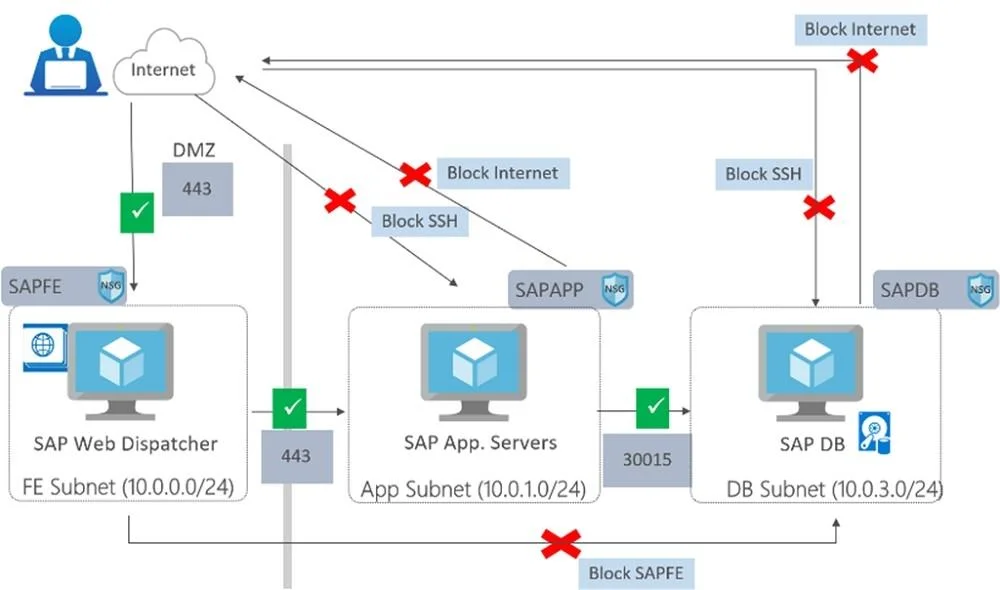
The correct answer is C. Use an SAP Web Dispatcher to route all incoming connections. 1. A public internet user can reach the SAP Web-Dispatcher over port 443 2. The SAP Web-Dispatcher can reach the SAP Application server over port 443 3. The App Subnet accepts traffic on port 443 from 10.0.0.0/24 4. The SAP Application server sends traffic on port 30015 to the…
Design and implement an infrastructure to support SAP workloads on Azure
Question
You plan to migrate an SAP environment to Azure. You need to create a design to facilitate end-user access to SAP applications over the Internet, while restricting user access to the virtual machines of the SAP application servers. What should you include in the design?
Exhibit
Options
- AConfigure a public IP address for each SAP application server
- BDeploy an internal Azure Standard Load Balancer for incoming connections
- CUse an SAP Web Dispatcher to route all incoming connections
- DConfigure point-to-site VPN connections for each user
How the community answered
(37 responses)- A3% (1)
- B5% (2)
- C76% (28)
- D16% (6)
Explanation
- A public internet user can reach the SAP Web-Dispatcher over port 443 2. The SAP Web-Dispatcher can reach the SAP Application server over port 443 3. The App Subnet accepts traffic on port 443 from 10.0.0.0/24 4. The SAP Application server sends traffic on port 30015 to the SAP DB server 5. The DB subnet accepts traffic on port 30015 from 10.0.1.0/24. 6. Public Internet Access is blocked on both App Subnet and DB Subnet. https://azure.microsoft.com/en-in/blog/sap-on-azure-architecture-designing-for-security/
Topics
#SAP Web Dispatcher#internet access#network security#routing
Community Discussion
No community discussion yet for this question.