
AZ-120 · Question #217
Drag and Drop Question You have an SAP ERP Central Component (SAP ECC) deployment on Azure virtual machines. The virtual machines run Windows Server 2022 and are members of an Active Directory…
The correct answer is VM1; ABAP Central Services (ASCS); SAP Web Dispatcher. SAP ECC + Active Directory SSO via SAP GUI - Explanation > Note: The original question's task labels (what each numbered slot represents) appear to have been omitted from the copy. The explanation below reconstructs the likely tasks based on the SAP authentication flow and…
Question
Drag and Drop Question You have an SAP ERP Central Component (SAP ECC) deployment on Azure virtual machines. The virtual machines run Windows Server 2022 and are members of an Active Directory domain named contoso.com. You install SAP GUI on an Azure virtual machine named VM1 that runs Windows 10. You need to ensure that contoso.com users can sign in to SAP ECC via SAP GUI on VM1 by using their domain credentials. What should you do? To answer, drag the appropriate components to the correct tasks. Each component may be used once, more than once, or not at all. You may need to drag the split bar between panes or scroll to view content. NOTE: Each correct selection is worth one point. Answer:
Exhibit
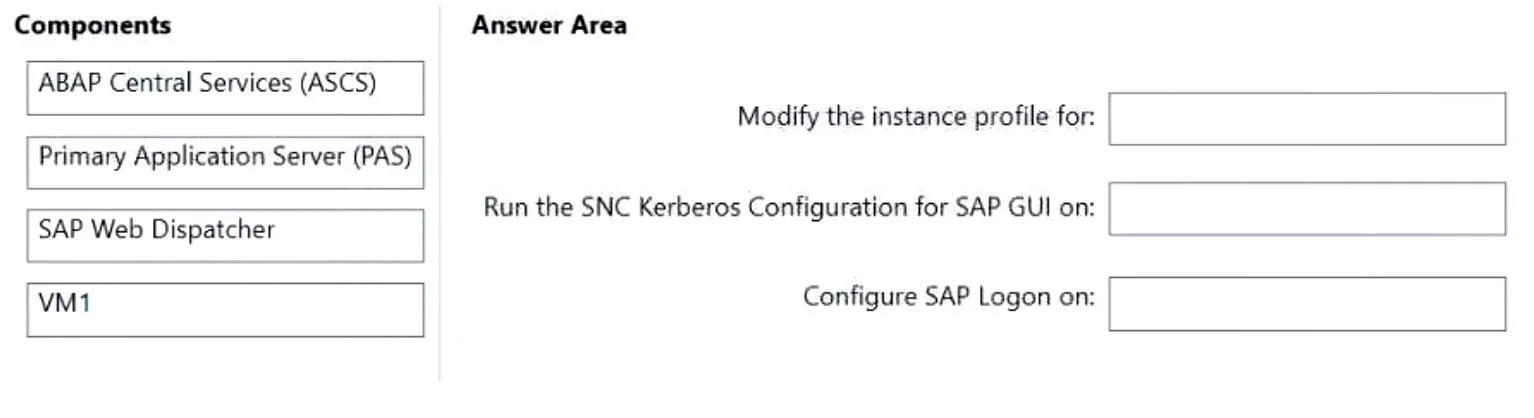
Answer Area
Drag items
Correct arrangement
- VM1
- ABAP Central Services (ASCS)
- SAP Web Dispatcher
Explanation
SAP ECC + Active Directory SSO via SAP GUI - Explanation
Note: The original question's task labels (what each numbered slot represents) appear to have been omitted from the copy. The explanation below reconstructs the likely tasks based on the SAP authentication flow and AZ-120 exam context.
The Core Concept
Enabling Active Directory (contoso.com) users to authenticate into SAP ECC via SAP GUI uses SNC (Secure Network Communications) with Kerberos. When a domain user launches SAP GUI, Windows provides a Kerberos ticket; SNC forwards that ticket to SAP for validation - no password prompt needed.
The three components that matter in this flow are exactly the ones selected.
Item-by-Item Breakdown
Position 1 → VM1
Task: Configure the SAP GUI client for SNC/SSO
VM1 is the machine running SAP GUI and is already domain-joined, so it can obtain Kerberos tickets from the AD domain controller. The client-side configuration requires:
- Installing the SAP Cryptographic Library (sapcrypto.dll) or SAP Secure Login Client on VM1
- Configuring the SAP GUI logon entry to use SNC (enabling the SNC name and library path in the SAP GUI connection settings)
Without this, SAP GUI has no mechanism to present the Kerberos ticket to the SAP system. VM1 is the starting point of the SSO chain.
Position 2 → ABAP Central Services (ASCS)
Task: Configure the SAP system for SNC/Kerberos (server-side)
The ASCS contains the Message Server, which is the first SAP component that SAP GUI contacts during logon (it handles logon load balancing and server group selection). For SSO to work:
- SNC profile parameters (
snc/enable,snc/identity/as,snc/gssapi_lib) must be set in the central SAP instance profile, which is managed at the ASCS level - A Service Principal Name (SPN) must be registered in Active Directory for the SAP service account tied to this instance
- The server's SNC identity must be trusted for Kerberos authentication
ASCS is the correct server-side target because it owns the central services and profile configuration that governs authentication for the entire SAP system.
Position 3 → SAP Web Dispatcher
Task: Configure the network entry point / proxy for SAP connections
The SAP Web Dispatcher acts as a reverse proxy and load balancer sitting in front of the SAP system. In Azure deployments, it's a best-practice architectural component that:
- Routes inbound SAP GUI connections (including SNC-wrapped ones) to the correct backend instance
- Can handle SPNEGO/Kerberos ticket forwarding for web-based SAP access (Fiori, Web GUI)
- Provides a single, stable network endpoint (important for SAP GUI logon configurations)
Even though SAP Web Dispatcher is most commonly associated with HTTP/browser access, in Azure SAP architectures it is placed in the connection path for SAP GUI as well, meaning SNC/SSO configuration must account for it.
Why Primary Application Server (PAS) is NOT selected
This is the most common mistake. The PAS is where ABAP application logic runs, but it is not the authentication control point. Authentication decisions are made at the message server (ASCS) before the user's session is even handed off to an application server. Selecting PAS here mistakes "where the work happens" for "where authentication is configured."
Common Misconceptions
| Misconception | Reality |
|---|---|
| "Configure SSO on the PAS because that's where users connect" | SAP GUI connects to the Message Server (ASCS) first; the PAS is assigned after auth |
| "SAP Web Dispatcher is only for browser/Fiori access" | In Azure deployments it's in the connection path for SAP GUI too |
| "VM1 doesn't need configuration because it's already domain-joined" | Domain membership gives you Kerberos tickets, but SAP GUI still needs SNC configured to use them |
| "ASCS is only for high availability, not authentication" | ASCS owns the central profile and Message Server - both are critical to SSO |
Topics
Community Discussion
No community discussion yet for this question.