
AZ-120 · Question #170
Drag and Drop Question You plan to deploy SAP HANA to an Azure virtual machine that has a constrained vCPU size. You need to validate that the virtual machine complies with SAP-defined resource…
The correct answer is Download the HCMT.; Run the SAPCAR utility.; Run the hcmtsetup command.; Run the hcmt command and specify the executionplan.json parameter.; Upload the ZIP file to the SAP HANA Hardware and Cloud Measurement Analysis. SAP HANA HCMT Validation on Azure - Step-by-Step Explanation The Correct Order & Why --- 1. Download the HCMT HCMT is distributed by SAP as a compressed archive (.SAR format). You must first obtain this package from the SAP Software Download Center before anything else can…
Question
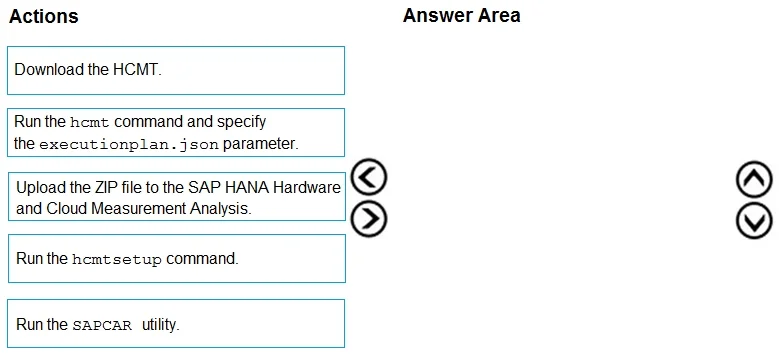
Drag and Drop Question You plan to deploy SAP HANA to an Azure virtual machine that has a constrained vCPU size. You need to validate that the virtual machine complies with SAP-defined resource requirements by using the SAP HANA Hardware and Cloud Measurement Tools (HCMT). In which order should you perform the actions? To answer, move all actions from the list of actions to the answer area and arrange them in the correct order. Answer:
Exhibit
Answer Area
Drag items
Correct arrangement
- Download the HCMT.
- Run the SAPCAR utility.
- Run the hcmtsetup command.
- Run the hcmt command and specify the executionplan.json parameter.
- Upload the ZIP file to the SAP HANA Hardware and Cloud Measurement Analysis.
Explanation
SAP HANA HCMT Validation on Azure - Step-by-Step Explanation
The Correct Order & Why
1. Download the HCMT
HCMT is distributed by SAP as a compressed archive (.SAR format). You must first obtain this package from the SAP Software Download Center before anything else can happen. Nothing else is possible without the binary.
2. Run the SAPCAR utility
SAP distributes tools in .SAR archives, which are SAP's proprietary compressed format - not standard .zip or .tar.gz. SAPCAR is SAP's own extraction tool that unpacks .SAR files. You must extract the HCMT archive before you can run any of its commands.
Common misconception: People familiar with Linux assume
tarorunzipworks. It does not..SARrequires SAPCAR specifically.
3. Run the hcmtsetup command
After extraction, hcmtsetup initializes and configures the HCMT environment - it sets up directories, dependencies, and generates the executionplan.json file that defines which benchmarks to run. You cannot run hcmt without first running hcmtsetup, because the execution plan file doesn't exist yet.
Common mistake: Skipping setup and going straight to
hcmt. This fails becauseexecutionplan.jsonhasn't been created.
4. Run the hcmt command and specify the executionplan.json parameter
This is the actual measurement phase. The hcmt command executes the benchmarks (CPU, memory, storage, network I/O) defined in executionplan.json against the VM. For constrained vCPU sizes, this step validates whether the VM meets SAP's minimum resource thresholds. The output is a ZIP file containing all results.
5. Upload the ZIP file to the SAP HANA Hardware and Cloud Measurement Analysis
The ZIP produced by hcmt is not human-readable on its own. You upload it to SAP's HCMT Analysis portal, which processes the results and produces a pass/fail compliance report against SAP-certified hardware requirements. This must be last - it requires the output from step 4.
Key Takeaways
| Mistake | Why It's Wrong |
|---|---|
Running hcmt before hcmtsetup | executionplan.json doesn't exist yet |
| Skipping SAPCAR and trying other extractors | .SAR format is proprietary to SAP |
Uploading before running hcmt | There's no ZIP file to upload yet |
The logical flow is: Get → Extract → Initialize → Measure → Analyze.
Topics
Community Discussion
No community discussion yet for this question.