nerdexam
Microsoft

AZ-120 · Question #143

Drag and Drop Question You have an Azure subscription. You plan to deploy a SAP NetWeaver landscape that will use SQL Server on Azure virtual machines. The solution must meet the following…

The correct answer is Create a proximity placement group; Create an Availability Set; Deploy SQL Server on Azure virtual machines; Deploy the application tier in the Azure virtual machines. Azure SAP NetWeaver Deployment - Drag-and-Drop Explained The Two Requirements to Satisfy | Requirement | Azure Feature That Satisfies It | |---|---| | App + DB tiers in the same Azure zone (low latency co-location) | Proximity Placement Group (PPG) | | App tier VMs in the same…

Design and implement an infrastructure to support SAP workloads on Azure

Question

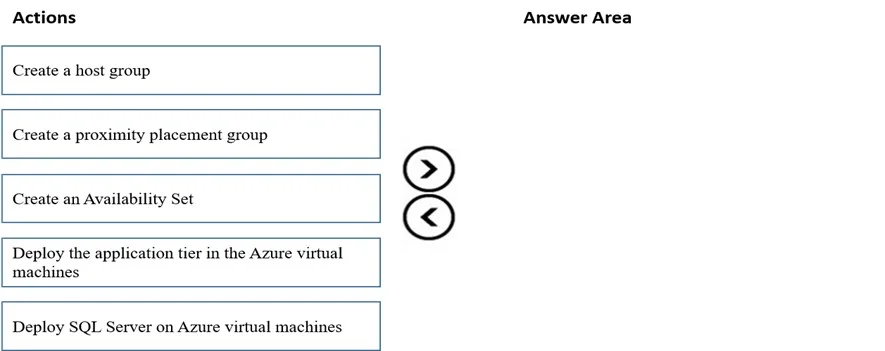
Drag and Drop Question You have an Azure subscription. You plan to deploy a SAP NetWeaver landscape that will use SQL Server on Azure virtual machines. The solution must meet the following requirements: - The SAP application and database tiers must reside in the same Azure zone. - The application tier in the Azure virtual machines must belong to the same Availability Set. Which four actions should you perform in sequence? To answer, move the appropriate actions from the list of actions to the answer area and arrange them in the correct order. NOTE: More than one order of answer choices is correct. You will receive credit for any of the correct orders you select. Answer:

Exhibit
AZ-120 question #143 exhibit

Answer Area

Drag items

Create a host groupCreate a proximity placement groupCreate an Availability SetDeploy the application tier in the Azure virtual machinesDeploy SQL Server on Azure virtual machines

Correct arrangement

  • Create a proximity placement group
  • Create an Availability Set
  • Deploy SQL Server on Azure virtual machines
  • Deploy the application tier in the Azure virtual machines

Explanation

Azure SAP NetWeaver Deployment - Drag-and-Drop Explained

The Two Requirements to Satisfy

RequirementAzure Feature That Satisfies It
App + DB tiers in the same Azure zone (low latency co-location)Proximity Placement Group (PPG)
App tier VMs in the same Availability SetAvailability Set

Step-by-Step Reasoning

Step 1 - Create a proximity placement group

A PPG is a logical grouping construct that forces Azure to place all associated resources in the same physical datacenter rack area. It must be created first because both the Availability Set and individual VMs must reference it at creation time - you cannot retroactively associate an existing Availability Set or a deployed VM with a PPG. Everything downstream depends on this resource existing.

Step 2 - Create an Availability Set

The Availability Set must be created before any VMs are deployed, because a VM's Availability Set membership is set at deployment and is immutable - you cannot move a running VM into an AS. Critically, this AS must be associated with the PPG created in Step 1 at creation time, ensuring all app-tier VMs inherit the PPG's physical placement constraint.

Step 3 - Deploy SQL Server on Azure virtual machines

The database tier VM is deployed into the PPG directly (not into the Availability Set, which is scoped to the app tier per the requirements). This step anchors the PPG - the first VM deployed into a PPG locks its physical location within Azure. Deploying the DB tier first ensures the physical placement is established before the app tier VMs are created.

Step 4 - Deploy the application tier in the Azure virtual machines

App-tier VMs are deployed last, into the Availability Set (which is already associated with the PPG). At this point all prerequisites are in place: the PPG is anchored, the AS exists and is linked to the PPG, and all VMs land in the same physical zone with fault/update domain separation guaranteed by the AS.


Why "Create a host group" is excluded

A host group is the parent resource for Azure Dedicated Hosts - physical servers reserved exclusively for your organization. This is a completely different concept from proximity placement. Nothing in the requirements mentions dedicated hardware, so this is a distractor designed to test whether you know the difference between:

  • Host group → Dedicated Host isolation (billing/compliance use case)
  • Proximity Placement Group → physical co-location of shared-infrastructure VMs

Common Mistakes

  1. Choosing "Create a host group" - confusing it with PPG. The word "group" and "host" can mislead candidates into thinking this relates to VM grouping for SAP.
  2. Deploying VMs before creating the Availability Set - the AS assignment is permanent and must exist pre-deployment.
  3. Creating the Availability Set without associating it to the PPG - this is a silent failure; the VMs would be in an AS but not co-located with the DB tier.
  4. Creating the PPG last - nothing else can be correctly configured without it as a foundation.

The Dependency Chain

PPG (anchors location)
 └── Availability Set (associated with PPG at creation)
      └── App-tier VMs (deployed into AS, inherit PPG constraint)
 └── SQL Server VM (deployed directly into PPG, anchors physical zone)

Topics

#proximity placement group#availability set#SAP NetWeaver deployment#SQL Server

Community Discussion

No community discussion yet for this question.

Full AZ-120 Practice