
AZ-104 · Question #88
An IT Administrator has deployed an Azure Web App to a service plan. The details of the App service plan are shown below: The IT Administrator needs to ensure that the Web application can scale on…
The correct answer is A. From the Scale Out blade of the App Service Plan, choose Autoscale C. From the Scale Up blade of the App Service Plan, change the service plan F. Add a scale condition to scale to a specific metric. Option B is incorrect since the Scale up option is used to change the App service plan Option D is incorrect since this is used to enable Autoscale Option E is incorrect since the Qmentions that we need to scale based on the CPU percentage…
Question
Exhibits
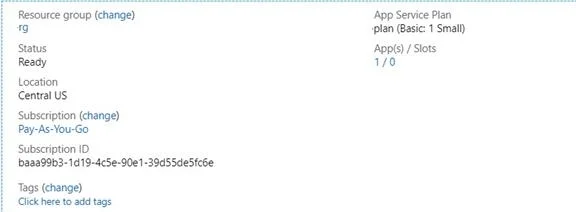
Options
- AFrom the Scale Out blade of the App Service Plan, choose Autoscale
- BFrom the Scale Up blade of the App Service Plan, choose Autoscale
- CFrom the Scale Up blade of the App Service Plan, change the service plan
- DFrom the Scale Out blade of the App Service Plan, change the service plan
- EAdd a scale condition to scale to a specific Instance count
- FAdd a scale condition to scale to a specific metric
How the community answered
(40 responses)- A45% (18)
- B15% (6)
- D33% (13)
- E8% (3)
Explanation
Option B is incorrect since the Scale up option is used to change the App service plan Option D is incorrect since this is used to enable Autoscale Option E is incorrect since the Qmentions that we need to scale based on the CPU percentage https://docs.microsoft.com/en-us/azure/app-service/overview-hosting-plans
Community Discussion
No community discussion yet for this question.