
AZ-104 · Question #832
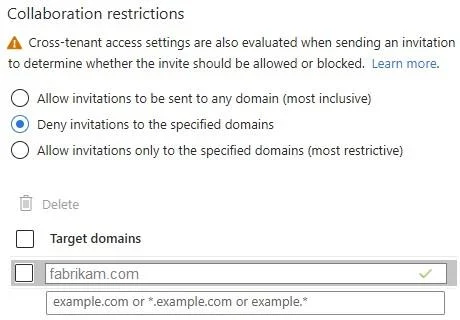
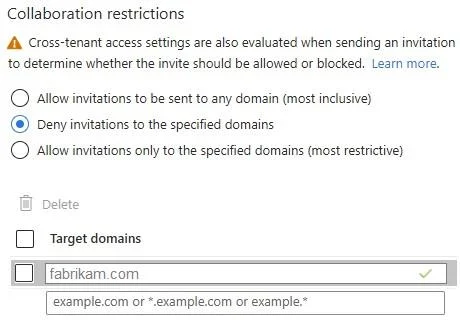
Hotspot Question You have a Microsoft Entra tenant named contoso.com that has the External collaboration settings shown in the following exhibit. The tenant contains the users shown in the following…
The correct answer is User2 can view the Manager property of User1. = No; User2 can invite a user named [email protected] to collaborate. = Yes; User2 can create a Microsoft 365 group in the contoso.com tenant. = No. In Microsoft Entra External Collaboration settings, guest user permissions are restricted by default. Guest users have limited access to directory objects - by default, guests cannot read other users' full profile properties (like Manager), so User2 cannot view User1's Manager…
Question
Exhibits
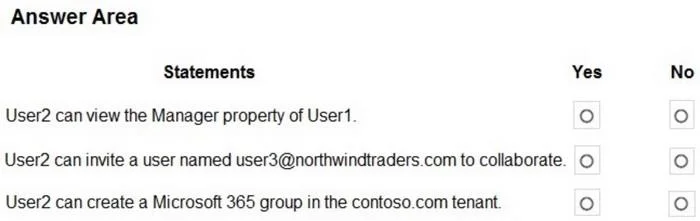
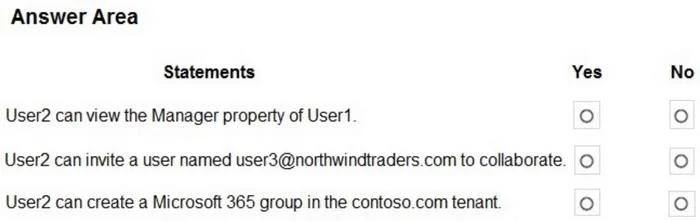
Answer Area
- User2 can view the Manager property of User1.No
- User2 can invite a user named [email protected] to collaborate.Yes
- User2 can create a Microsoft 365 group in the contoso.com tenant.No
Explanation
In Microsoft Entra External Collaboration settings, guest user permissions are restricted by default. Guest users have limited access to directory objects - by default, guests cannot read other users' full profile properties (like Manager), so User2 cannot view User1's Manager property. However, if the External Collaboration settings allow 'Members and guests can invite' or 'Anyone can invite,' a guest like User2 can invite external users (such as [email protected]), which explains the 'Yes' for statement 2. Guest users are restricted from creating Microsoft 365 groups by default, as group creation permissions are typically limited to members and administrators, not guest users.
Topics
Community Discussion
No community discussion yet for this question.