
AZ-104 · Question #826
Hotspot Question You have an on-premises network. You have an Azure subscription that contains two virtual networks named VNet1 and VNet2. VNet1 uses an IP address space of 192.168.8.0/24. VNet2…
This question tests your knowledge of Azure networking components needed to connect VNet1 to VNet2 and connect an on-premises network to Azure while minimizing costs.
Question
Exhibit
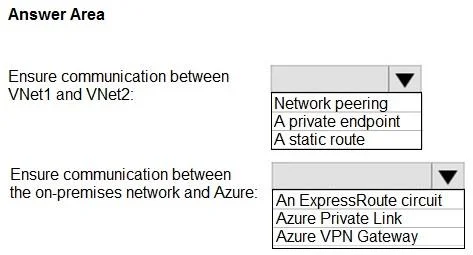
Answer Area
- Ensure communication between VNet1 and VNet2:Network peeringA private endpointA static route
- Ensure communication between the on-premises network and Azure:An ExpressRoute circuitAzure Private LinkAzure VPN Gateway
Explanation
This question tests your knowledge of Azure networking components needed to connect VNet1 to VNet2 and connect an on-premises network to Azure while minimizing costs.
Approach. For VNet1-to-VNet2 communication, you should use VNet Peering (specifically VNet-to-VNet peering), which is the most cost-effective way to connect two Azure virtual networks and allows resources in both VNets to communicate directly over the Microsoft backbone. For on-premises connectivity, you should use a single VPN Gateway (specifically a site-to-site VPN) deployed in one VNet, and then use Global VNet Peering or configure the gateway to allow gateway transit so that the on-premises network can reach both VNets through a single gateway - this minimizes costs by avoiding the need to deploy a VPN Gateway in each VNet. The key settings are 'Allow Gateway Transit' on the VNet that has the gateway and 'Use Remote Gateways' on the peered VNet without a gateway. This means you need: one VPN Gateway (not two), VNet Peering between VNet1 and VNet2, and a Local Network Gateway representing the on-premises network.
Concept tested. Azure Virtual Network Peering, VPN Gateway with Gateway Transit, and cost-optimized hybrid connectivity design. The scenario specifically tests understanding that VNet peering with gateway transit allows a single VPN Gateway to serve multiple peered VNets, avoiding the cost of deploying redundant gateways.
Reference. https://learn.microsoft.com/en-us/azure/vpn-gateway/vpn-gateway-peering-gateway-transit
Topics
Community Discussion
No community discussion yet for this question.