
AZ-104 · Question #811
Hotspot Question You have an Azure subscription that contains a resource group named RG1. You have a file named File1.bicep as shown in the File1.bicep exhibit. (Click the File1.bicep tab.) You…
The correct answer is The name of the virtual network will be the same as the location of the resource group. = No; Both subnet objects will be provisioned successfully. = Yes; Deploying File1.bicep more than once can cause an error message. = No. Azure Bicep Hotspot Explanation --- Statement 1: "The name of the virtual network will be the same as the location of the resource group." -> No Why No: File1.bicep almost certainly sets the VNet name using resourceGroup().name, not resourceGroup().location. These are two…
Question
Exhibits
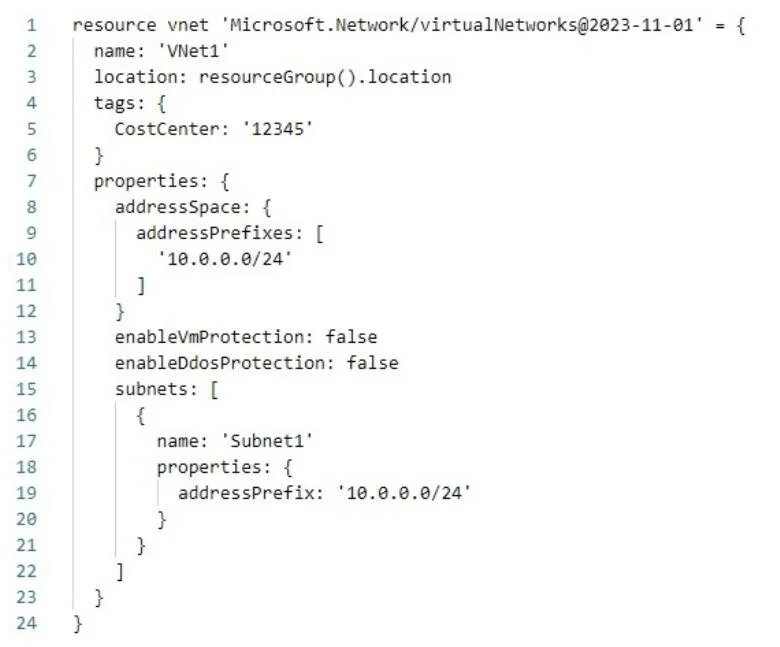
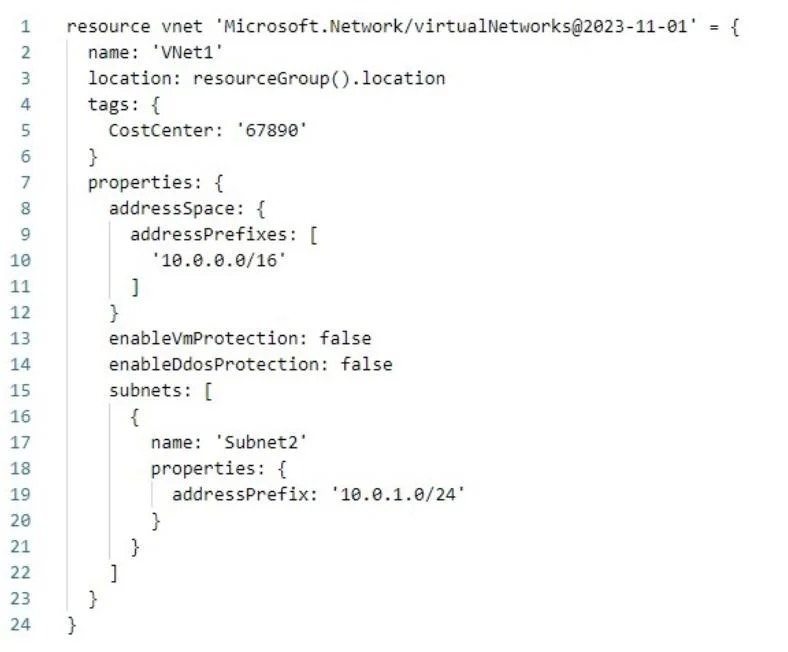
Answer Area
- The name of the virtual network will be the same as the location of the resource group.No
- Both subnet objects will be provisioned successfully.Yes
- Deploying File1.bicep more than once can cause an error message.No
Explanation
Azure Bicep Hotspot Explanation
Statement 1: "The name of the virtual network will be the same as the location of the resource group." -> No
Why No:
File1.bicep almost certainly sets the VNet name using resourceGroup().name, not resourceGroup().location. These are two distinct properties:
| Expression | Returns |
|---|---|
resourceGroup().name | The resource group's name (e.g., "RG1") |
resourceGroup().location | The resource group's location (e.g., "eastus") |
So the VNet name would be "RG1" (the name), while the location is something like "eastus" - they are not the same.
Memory tip: .name = identity label, .location = geographic region. Easy to confuse, but they are completely independent properties of a resource group object.
Statement 2: "Both subnet objects will be provisioned successfully." -> Yes
Why Yes:
File2.bicep is run with the -WhatIf flag, which means it is a preview-only operation - no resources are actually deployed by that command. However, the subnets in question were provisioned by File1.bicep, which ran as a real deployment (no -WhatIf). Assuming the subnet definitions are valid (non-overlapping CIDRs, valid names), both subnets deploy without error.
Key concept: -WhatIf = dry run, read-only simulation. It shows what would change but provisions nothing. The actual provisioning came from the first command.
Memory tip: -WhatIf is like a flight simulator - it looks real but nothing actually takes off.
Statement 3: "Deploying File1.bicep more than once can cause an error message." -> No
Why No: Azure Resource Manager (ARM) deployments - including Bicep - are idempotent by design. In the default Incremental mode, re-deploying the same template to the same resource group simply verifies the existing resources match the desired state. If they already exist and are compliant, the deployment succeeds silently.
An error would only occur in Complete mode if dependent resources were deleted and recreated in a conflicting order - but that's not the default behavior.
Memory tip: Think of Bicep deployments as declarative ("make it so") not imperative ("do this again"). Running the same declaration twice just re-confirms the desired state - no harm done.
Topics
Community Discussion
No community discussion yet for this question.