
AZ-104 · Question #794
You have a Standard Azure App Service plan named Plan1. You need to ensure that Plan1 will scale automatically when the CPU usage of the web app exceeds 80 percent. What should you select for Plan1?
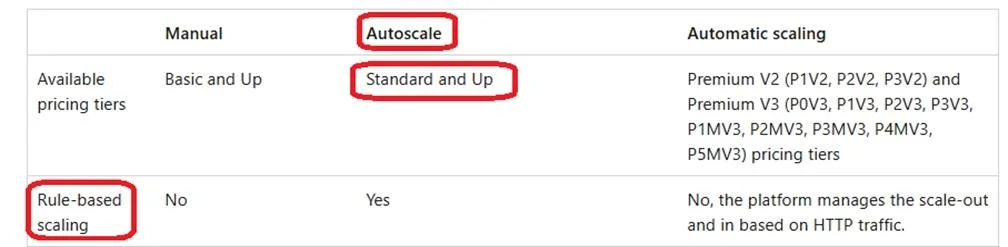
The correct answer is B. Automatic in the Scale out method settings. A Standard Service plan is fine. Use a Scale-out rule. Note 1: Web Apps, Automatic scaling in Azure App Service A comparison of scale-out and scale in options available on App Service: Note 2: Autoscale allows you to automatically scale your applications or resources based on…
Question
Exhibit
Options
- AAutomatic in the Scale out method settings
- BAutomatic in the Scale out method settings
- CPremium P1 in the Scale up (App Service plan) settings
- DStandard S1 in the Scale up (App Service plan) settings
- EManual in the Scale out method settings
How the community answered
(47 responses)- A11% (5)
- B81% (38)
- C2% (1)
- D6% (3)
Explanation
A Standard Service plan is fine. Use a Scale-out rule. Note 1: Web Apps, Automatic scaling in Azure App Service A comparison of scale-out and scale in options available on App Service: Note 2: Autoscale allows you to automatically scale your applications or resources based on demand. Use Autoscale to provision enough resources to support the demand on your application without over provisioning and incurring unnecessary costs. https://learn.microsoft.com/en-us/azure/app-service/manage-automatic-scaling https://learn.microsoft.com/en-us/azure/azure-monitor/autoscale/autoscale-get-started
Topics
Community Discussion
No community discussion yet for this question.