
AZ-104 · Question #788
Hotspot Question You have an Azure subscription named Subscription In Subscription1, you create an Azure file share named share1. You create a shared access signature (SAS) named SAS1 as shown in…
The correct answer is If on January 2, 2025, you run Microsoft Azure Storage Explorer on a computer that has an IP address of 193.77.134.1, and you use SAS1 to connect to the storage account, you: will be prompted for credentials; If on January 10, 2025, you run the net use command on a computer that has an IP address of 193.77.134.50, and you use SAS1 as the password to connect to share1, you: will have no access. This question requires analyzing a Shared Access Signature (SAS) configuration to determine access outcomes based on different scenarios. SAS1 Configuration from Exhibit: Valid Dates: From January 1, 2025, to January 31, 2025. Allowed IP addresses: 193.77.134.1. Allowed…
Question
Exhibits
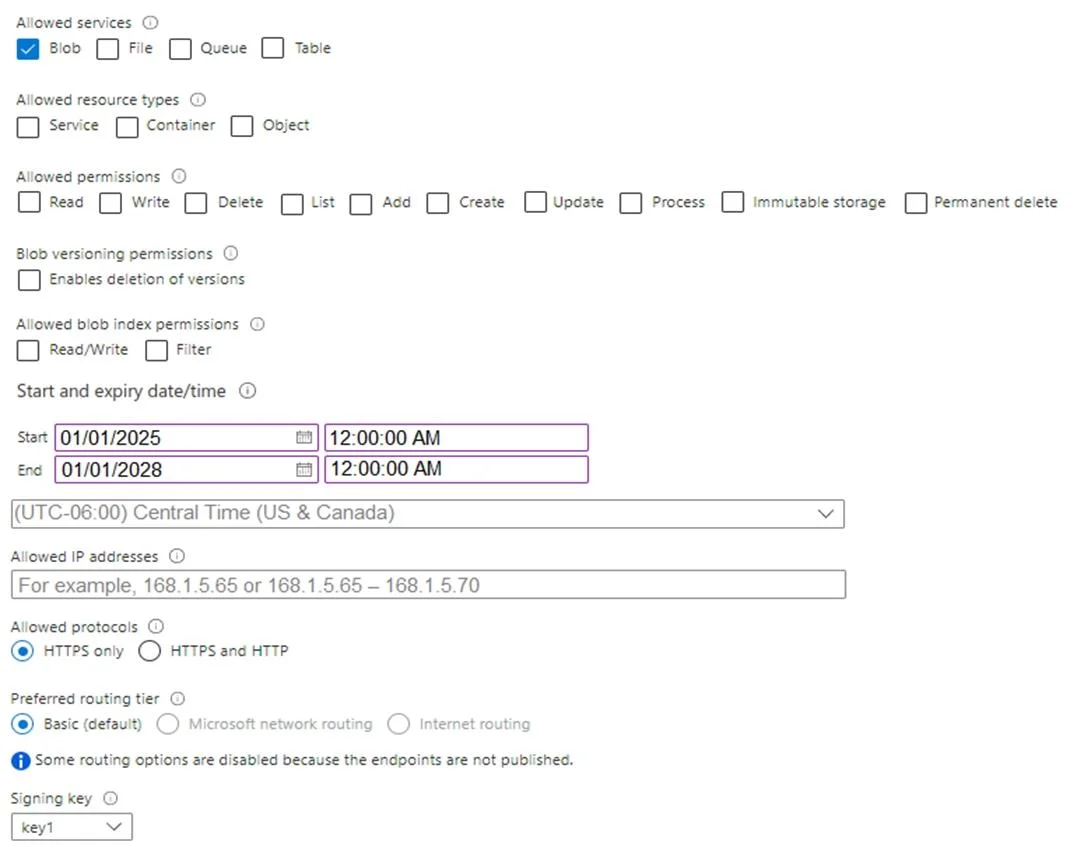
Answer Area
- If on January 2, 2025, you run Microsoft Azure Storage Explorer on a computer that has an IP address of 193.77.134.1, and you use SAS1 to connect to the storage account, youwill be prompted for credentialswill be prompted for credentialswill have no accesswill have read, write, and list accesswill have read-only access
- If on January 10, 2025, you run the net use command on a computer that has an IP address of 193.77.134.50, and you use SAS1 as the password to connect to share1, youwill have no accesswill be prompted for credentialswill have no accesswill have read, write, and list accesswill have read-only access
Explanation
This question requires analyzing a Shared Access Signature (SAS) configuration to determine access outcomes based on different scenarios.
SAS1 Configuration from Exhibit:
- Valid Dates: From January 1, 2025, to January 31, 2025.
- Allowed IP addresses:
193.77.134.1. - Allowed service: File (checked).
- Allowed resource types: None checked.
- Allowed permissions: None checked.
- Allowed protocols: HTTPS only.
Box 1: If on January 2, 2025, you run Microsoft Azure Storage Explorer on a computer that has an IP address of 193.77.134.1, and you use SAS1 to connect to the storage account, you => will be prompted for credentials
- The connection attempt on January 2, 2025, is within
SAS1's valid date range. The computer's IP address193.77.134.1also precisely matches the allowed IP address specified inSAS1. - However, according to the official explanation provided on the page,
SAS1has "Allowed permissions: Blank" and "Allowed resource types: Blank." Although the exhibit visually shows 'File' service checked, the critical absence of explicit permissions (such as Read, Write, List) and resource type definitions means the SAS token is ineffective for authorizing specific operations. When an ineffective SAS is used, Microsoft Azure Storage Explorer cannot gain authorized access and will consequently prompt the user for full account credentials.
Box 2: If on January 10, 2025, you run the net use command on a computer that has an IP address of 193.77.134.50, and you use SAS1 as the password to connect to share1, you => will have no access
- The connection attempt on January 10, 2025, is within
SAS1's valid date range. However, the computer's IP address is193.77.134.50. SAS1is explicitly configured to allow access only from the IP address193.77.134.1. Since the connecting computer's IP address193.77.134.50does not match the allowed IP address, the access attempt will be denied due to this IP restriction, resulting in no access.- The official explanation on the page also states that
SAS1"Allowed services does not include File." If this were the case, it would provide an additional reason why access to a file share (share1) would be denied, leading to no access, irrespective of the IP address.
Topics
Community Discussion
No community discussion yet for this question.