
AZ-104 · Question #768
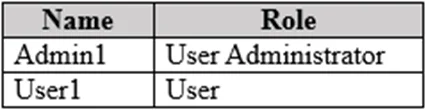
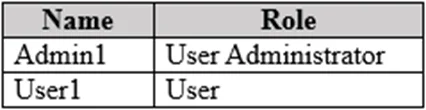
Hotspot Question You have a Microsoft Entra tenant that contains the users shown in the following table. You need to perform the following tasks: - Create an attribute named Property1. - Ensure that…
The correct answer is Users = No; Groups = No; External identities = No; Roles and administrators = Yes; Administrative units = No; Delegated admin partners = No; Enterprise applications = No; Devices = No; App registrations = No; Identity Governance = No; Application proxy = No; Custom security attributes = Yes; Licenses = No; Cross-tenant synchronization = No; Microsoft Entra Connect = No; Custom domain names = No; Mobility (MDM and WIP) = No; Password reset = No; Company branding = No; User settings = No. To create a custom security attribute (Property1) in Microsoft Entra ID, you must navigate to 'Custom security attributes' on the Microsoft Entra ID blade. To allow Admin1 to assign that attribute to User1, you must configure 'Roles and administrators' to assign Admin1 the…
Question
Exhibits
Answer Area
- UsersNo
- GroupsNo
- External identitiesNo
- Roles and administratorsYes
- Administrative unitsNo
- Delegated admin partnersNo
- Enterprise applicationsNo
- DevicesNo
- App registrationsNo
- Identity GovernanceNo
- Application proxyNo
- Custom security attributesYes
- LicensesNo
- Cross-tenant synchronizationNo
- Microsoft Entra ConnectNo
- Custom domain namesNo
- Mobility (MDM and WIP)No
- Password resetNo
- Company brandingNo
- User settingsNo
Explanation
To create a custom security attribute (Property1) in Microsoft Entra ID, you must navigate to 'Custom security attributes' on the Microsoft Entra ID blade. To allow Admin1 to assign that attribute to User1, you must configure 'Roles and administrators' to assign Admin1 the 'Attribute Assignment Administrator' role, which grants permission to assign custom security attribute values to users and other objects.
Topics
Community Discussion
No community discussion yet for this question.