
Microsoft
AZ-104 · Question #742
Hotspot Question You have an Azure subscription linked to a hybrid Microsoft Entra tenant. The tenant contains the users shown in the following table. You create the Azure Files shares shown in the…
The correct answer is User1 can access the content in share1. = No; User2 can access the content in share2. = Yes; User2 can access the content in share3. = No. Here's the breakdown for each statement: User1 can access the content in share1. => No User1 is a cloud-only user, as indicated by "On-premises sync enabled: No". The storage account contoso2024 (which hosts share1) is configured with an Active Directory authentication source…
Submitted by zhang_li· Mar 4, 2026Implement and manage storage
Question
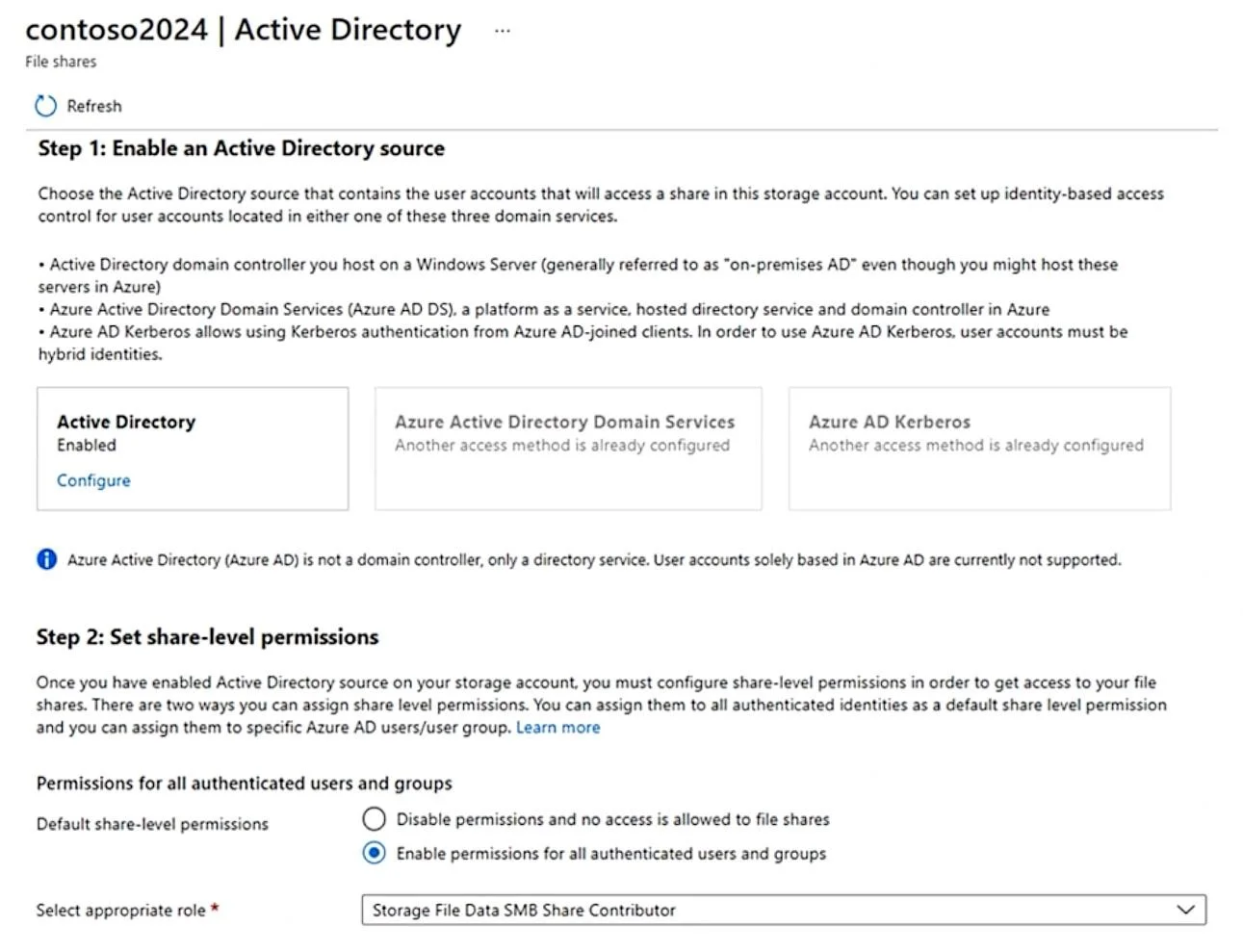
Hotspot Question You have an Azure subscription linked to a hybrid Microsoft Entra tenant. The tenant contains the users shown in the following table. You create the Azure Files shares shown in the following table. You configure identity-based access for contoso2024 as shown in the following exhibit. For each of the following statements, select Yes if the statement is true. Otherwise, select No. NOTE: Each correct selection is worth one point. Answer:
Exhibits
Answer Area
- User1 can access the content in share1.No
- User2 can access the content in share2.Yes
- User2 can access the content in share3.No
Explanation
Here's the breakdown for each statement:
-
User1 can access the content in share1. => No
- User1 is a cloud-only user, as indicated by "On-premises sync enabled: No".
- The storage account
contoso2024(which hostsshare1) is configured with an Active Directory authentication source. The exhibit shows "Azure Active Directory" selected for Step 1, with a critical note stating that "User accounts solely based in Azure AD are currently not supported" for identity-based access. This means cloud-only users like User1 cannot authenticate against this configuration.
-
User2 can access the content in share2. => Yes
- User2 is a hybrid user, synced from an on-premises Active Directory, as indicated by "On-premises sync enabled: Yes".
- The storage account
contoso2024(hostingshare2) has an Active Directory authentication source configured. As a hybrid user, User2 can successfully authenticate against this AD source. - Share-level permissions for
contoso2024are configured to "Enable permissions for all authenticated users and groups" with the "Storage File Data SMB Share Contributor" role, which User2 receives upon successful authentication.
-
User2 can access the content in share3. => No
share3is located on the storage accountcontoso2025.- The problem description and exhibit only detail the identity-based access configuration for
contoso2024. There is no information provided, nor is it implied, thatcontoso2025has an Active Directory authentication source configured. Without identity-based access enabled forcontoso2025, User2 cannot use their AD identity to accessshare3.
Topics
#Azure Files#Azure Files identity-based access#Microsoft Entra hybrid identity#Azure Files permissions
Community Discussion
No community discussion yet for this question.