
AZ-104 · Question #709
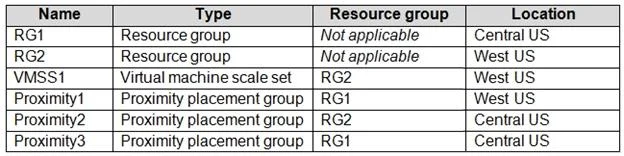
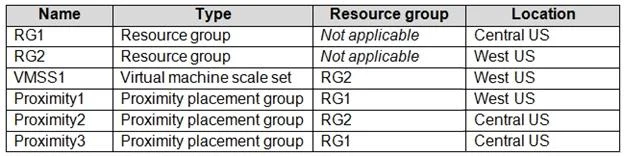
You have an Azure subscription that contains the resources shown in the following table. You need to configure a proximity placement group for VMSS1. Which proximity placement groups should you use?
The correct answer is C. Proximity1 only. To configure a proximity placement group for VMSS1, you must select a group located in the exact same Azure region as VMSS1.
Question
Exhibits
Options
- AProximity2 only
- BProximity1, Proximity2, and Proximity3
- CProximity1 only
- DProximity1 and Proximity3 only
How the community answered
(27 responses)- A4% (1)
- B7% (2)
- C85% (23)
- D4% (1)
Why each option
To configure a proximity placement group for VMSS1, you must select a group located in the exact same Azure region as VMSS1.
This is incorrect because Proximity2 is in "West US", which is a different region than VMSS1's "East US" location, making it incompatible for co-location.
This is incorrect because Proximity2 and Proximity3 are in different Azure regions ("West US" and "East US 2" respectively) than VMSS1's "East US" region, violating the single-region requirement for proximity placement groups.
Proximity placement groups are designed to co-locate Azure resources within the *same specific Azure region* to achieve the lowest possible latency. Since VMSS1 is deployed in "East US", only Proximity1, which is also in "East US", can be used to group VMSS1.
This is incorrect because Proximity3 is in "East US 2", which is a distinct Azure region from "East US", preventing VMSS1 from being placed in that group.
Concept tested: Proximity Placement Group regional constraint
Source: https://learn.microsoft.com/en-us/azure/virtual-machines/co-location#how-to-use-proximity-placement-groups
Topics
Community Discussion
No community discussion yet for this question.